Ethan Cole

Replacement of the strap on your Casio timepiece is a straightforward process. The task usually does not require specialized tools, making it accessible for most users. Begin by determining the width of your existing band, which is critical for selecting a compatible new one. Most Casio models use standard screw or spring bar systems for attachment.
To remove the current strap, locate the spring bars that secure it to the case. A small tool specifically designed for this purpose can make the task easier, allowing you to depress the bar and release the strap. If you don’t have such a tool, a fine-tipped object can also suffice. Be careful to apply gentle pressure to avoid damaging the case or the existing band.
After removing the old band, select a new strap that meets both your style and comfort preferences. Consider materials ranging from metal to rubber or leather, as Casio is compatible with various options. Ensure that the attachment mechanism matches your model to guarantee a secure fit. Following the same procedure in reverse, attach the new strap by sliding it into place and securing it with the spring bars.
Wristband Compatibility for Casio Timepieces
Yes, it is possible to replace the strap on your Casio timepiece. Most models feature a standard attachment mechanism, allowing for a simple swap. Check the model number to ensure compatibility with aftermarket bands or replacements.
The following table outlines common attachment types and their respective methods for removal:


| Attachment Type | Removal Method |
|---|---|
| Spring Bar | Use a spring bar tool to compress the bar and pull the strap away from the case. |
| Quick Release | Pull the lever on the strap and slide it off the lugs. |
| Screw-in Link | Utilize a screwdriver to unscrew the links, detaching the band. Ensure to keep screws in a safe place. |
Select an appropriate replacement that matches the width specifications, typically indicated in millimeters. Consider material and style to align with personal aesthetics and functionality. Installation is straightforward, but take care to follow the removal and attachment instructions accurately to maintain the integrity of your timepiece.
Identifying the Right Replacement Wristband for Your Casio Model
To ensure a proper fit, start by checking the model number on the packaging or the timepiece itself. This number typically begins with “G” or “M” for models like the G-Shock or Marine Gear. Many replacement bands are specifically designed for certain models, so matching this number is crucial.
Material Considerations
Evaluate the materials available for replacement. Silicone and rubber are excellent options for those seeking comfort and durability, while metal alternatives offer a more classic look and feel. Leather bands provide a stylish option but may require more maintenance to uphold their appearance.
Width and Attachment Type
Pay attention to the width of the strap and how it connects to the case. Most timepieces will have specific lug widths, usually measured in millimeters. Ensure that the new strap aligns with the attachment points, whether they are spring bars or specialized connectors, to maintain functionality.
Tools Required for Changing the Bracelet on a Timepiece
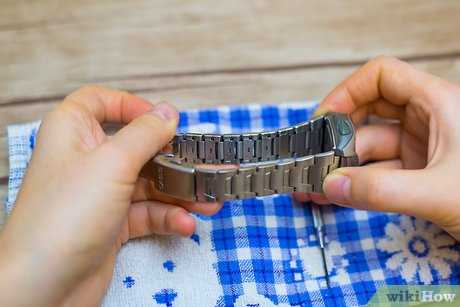
A few specific tools are necessary for a smooth replacement process. Gather the following items before beginning:
- Spring Bar Tool: This tool is essential for removing and attaching the spring bars, which hold the band in place.
- Screwdriver Set: If your model utilizes screws to secure the strap, a set of small screwdrivers will be necessary.
- Tweezers: Useful for handling small components without damaging them, especially during reassembly.
- Work Cloth: A soft cloth to protect the timepiece from scratches while you work.
- Magnifying Glass: Helpful for examining small parts closely, ensuring precision during the process.
- Replacement Band: Ensure the new band is compatible with your model.
Optional Tools
- Watch Holder: Keeps the timepiece steady during the procedure.
- Lubricant: A tiny amount can be applied to spring bars if they appear stiff.
Using the right tools will facilitate an efficient and secure replacement procedure for your timepiece’s band.
Step-by-Step Guide to Removing the Old Wristband
Begin by placing the timepiece face down on a soft surface to avoid scratches. Locate the quick-release pins or screws holding the current band in place.
If your model features quick-release pins, press down on the pin with a flat tool or your fingernail to compress the spring mechanism. Carefully slide the band out while maintaining pressure on the pin.
For models with screws, use a small screwdriver suitable for the size of the screws. Gently unscrew each fastener, ensuring not to lose them. Once removed, detach the band from the lugs.
Inspect the lugs for any debris or dirt. Clean the area to ensure a secure fit for the new band. Also, examine the attachment points on the band being removed for wear and tear.
Once the old band is detached, properly store it for future reference or replacement purposes.
How to Properly Attach the New Wristband
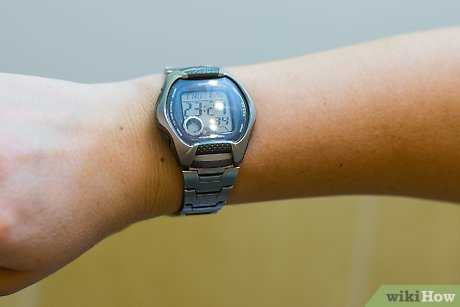
Align the new strap with the lugs on the case. Ensure that the spring bars are inserted correctly into the holes of the lugs.
- Take one end of the new strap and position it against the lug.
- Using a spring bar tool, compress the spring bar and slide it into the lug until it clicks into place.
- Repeat the process for the opposite end, ensuring both ends are secured.
- Double-check that the new strap is firmly attached by gently pulling on both ends.
If applicable, adjust the strap length for a comfortable fit. Most replacements include extra holes or adjustable buckles for customization.
- Check alignment; ensure the strap is straight and even on both sides.
- Inspect the attachments for any gaps or misalignments.
- After securing, wear the timepiece to confirm comfort and stability.
Regularly inspect the connection points to maintain safety and prevent accidental detachment.
Common Issues and Solutions When Changing Casio Wristbands
Improper fit of the new band can lead to discomfort. Ensure the replacement is the correct size; this often involves checking the width in millimeters before purchase.
Occasionally, pin misalignment can occur during reattachment. If the pin doesn’t line up with the holes, gently adjust the band and check for proper fit before securing it.
Material Compatibility Problems
Different materials might not interact well. For example, metal bands may scratch the case if they are too tight or poorly fitted. Always assess compatibility between materials and ensure that the connectors are suitable for your specific model.
Wear and Tear Issues
Over time, connectors can weaken. If the pins show signs of wear, replacing them before they break will ensure the longevity of the new accessory. It’s advisable to keep spare pins handy for quick replacements.
The process can also lead to scratches on the watch case. Use a soft cloth to cover the case during adjustments, minimizing the risk of damage.