
 Ethan Cole

Wearing a compact device on your arm can lead to discomfort in the surrounding area due to several factors. If the gadget fits too tightly, it can restrict blood flow and irritate the skin, resulting in aches. To avoid this, ensure that the band is neither too loose nor excessively tight; a snug fit is optimal while allowing for a little movement.
Materials also play a critical role in how the accessory interacts with your skin. Allergic reactions to certain substances like silicone or metal can cause inflammation and soreness. Opt for hypoallergenic materials if irritation occurs, and consider alternatives like fabric bands that may reduce friction.


Frequent usage without breaks can lead to overuse injuries. Regularly remove the device to allow your skin to breathe and to alleviate pressure. If discomfort persists, evaluate your posture and arm position while wearing the gadget. A slight adjustment can significantly enhance comfort levels.
Can a Smart Watch Induce Discomfort in the Forearm?
Regularly wearing a wearable device might lead to discomfort in the forearm area. Ensure a proper fit; devices that are too tight can compress soft tissue, while loose ones may shift and irritate the skin. Adjust the strap frequently to avoid prolonged pressure on specific points.
Material Sensitivities
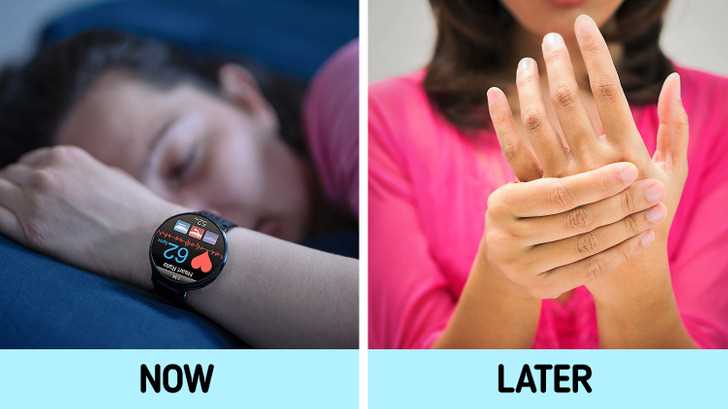
Check for allergies or sensitivities to the materials used in the band. Common issues arise from materials such as silicone or metals. Opt for hypoallergenic bands or explore cloth options if irritation occurs.
Posture and Usage
Consider the position of your arm during interaction with the device. Maintaining awkward angles for extended periods may contribute to aches. Incorporate regular breaks to relieve tension and allow mobility.
Understanding the Anatomy of the Wrist and Its Sensitivity
The wrist comprises eight small bones known as carpal bones, providing flexibility and movement. These bones are connected by ligaments, allowing a wide range of motion while maintaining stability. The presence of tendons allows the muscles of the forearm to transmit force for various hand movements.
It is crucial to consider that the wrist contains numerous nerve endings, making it highly sensitive to pressure and discomfort. Symptoms may arise from prolonged pressure or friction, especially when wearing timepieces that fit too tightly or have rough edges. This sensitivity can also be affected by underlying conditions, such as arthritis, inflammation, or repetitive strain injuries.
Areas of Concern
Two main areas can lead to discomfort: the ulnar and radial styloids, which can become irritated with excess pressure. Tight accessories can compress soft tissues, potentially resulting in soreness. Additionally, prolonged use of wearable technology can lead to overuse injuries that manifest as tenderness or aching sensations.
Preventative Measures
To minimize discomfort, opt for adjustable bands that promote airflow and accommodate the hand’s natural movements. Choose models that distribute weight evenly and avoid overly tight fittings. If you experience persistent discomfort, consider alternating to other styles of accessories or taking regular breaks to allow recovery.
Factors Contributing to Wrist Discomfort from Smart Watches
Improper fit plays a significant role in discomfort. A device too tight can irritate skin and compress nerves, while a loose version might shift and cause friction.
Material sensitivity is another key factor. Reactions to metals, plastics, or adhesives used in device construction can lead to irritation or allergic responses.
Prolonged usage increases strain on the joints. Extended wear during activities such as typing or exercising can lead to repetitive motion issues.
Weight and Bulk
Weight and bulkiness influence how the device sits on the arm. Heavier models may create additional stress on the arm muscles and tendons, heightening discomfort.
Usage Habits
Frequent adjustments or checking notifications can lead to awkward hand positions, causing undue stress. Avoiding constant adjustments can reduce the risk of strain.
- Ensure proper fit and comfort.
- Be mindful of material sensitivities.
- Limit long durations of use without breaks.
- Opt for lighter models if necessary.
- Practice good posture and ergonomics while interacting with the device.
How to Properly Wear a Smart Watch to Minimize Discomfort
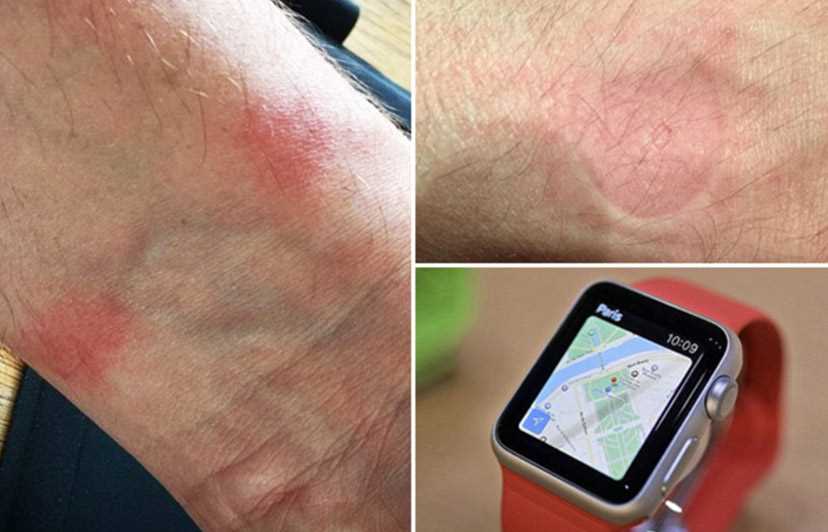
Position your device approximately one finger width above the wrist bone. This ensures the sensors maintain optimal contact without placing excess pressure on sensitive areas.
Adjust the strap to a snug fit; it should be tight enough to prevent movement but not so tight that it restricts blood circulation. Check for any signs of constriction, such as discoloration or tingling.
Periodically shift the positioning of the device during prolonged use. Allowing the band to alternate its location helps distribute weight evenly, reducing localized pressure points.
Choose straps made of breathable materials such as silicone or fabric. These options can minimize sweat accumulation and irritation, providing better comfort for extended wear.
Take regular breaks if using the device for long periods. Removing it for even a few minutes can alleviate discomfort and give your skin a chance to recover.
Be mindful of the activities performed while wearing the device. If engaging in sports or high-impact movements, consider adjusting the tightness for better stability without compromising comfort.
Pay attention to your body’s signals. If discomfort persists despite adjustments, consider consulting a specialist to explore underlying issues related to sensitivity or fitment.
Signs That Indicate Your Smart Watch May Be Causing Issues
Look for indications such as discomfort or irritation where the device rests. These sensations can signal improper fit or material sensitivity.
Physical Symptoms

- Swelling or redness around the area of contact.
- Persistent throbbing or aching sensations while wearing the device.
- Skin rashes or allergic reactions that develop over time.
Functional Discrepancies
- Difficulty adjusting the device correctly or feeling constricted during use.
- Frequent notifications about heart rate anomalies or fitness stats that seem erratic.
- Experiencing increased fatigue in the arm while engaging in activities.
Monitor these signs closely; timely adjustments or device considerations can alleviate discomfort and enhance your experience.
Alternative Solutions and Adjustments for Pain Relief
Adjust the fit of your device to alleviate discomfort. Ensure it’s snug but not too tight, allowing for adequate blood flow and comfort during wear.
Consider alternating the position of the device between your wrists. This practice can help distribute any pressure or strain more evenly throughout your limbs.
Take regular breaks from using the device. Periodically removing it for 10-15 minutes can significantly reduce strain on the area.
Incorporate wrist stretching exercises into your routine. Simple movements such as wrist flexion, extension, and rotations can improve flexibility and reduce tension.
Utilize a soft wrist pad or support, especially if wearing for extended periods. This cushioning can minimize direct pressure while providing additional comfort.
Explore alternative styles or designs. Devices with adjustable bands or softer materials may provide a more comfortable experience for sensitive skin.
Monitor your usage habits. Prolonged engagement with features like notifications can lead to unnecessary tension. Limit interaction when possible.
| Solution | Description |
|---|---|
| Adjust Fit | Ensure proper snugness to enhance comfort and circulation. |
| Alternate Position | Switch wrists to distribute pressure evenly. |
| Regular Breaks | Remove for short periods to relieve tension. |
| Stretching Exercises | Perform wrist movements to improve flexibility. |
| Wrist Support | Use padding to reduce direct pressure. |
| Explore Designs | Try different materials and styles for comfort. |
| Monitor Usage | Limit engagement with features to decrease strain. |



