Ethan Cole

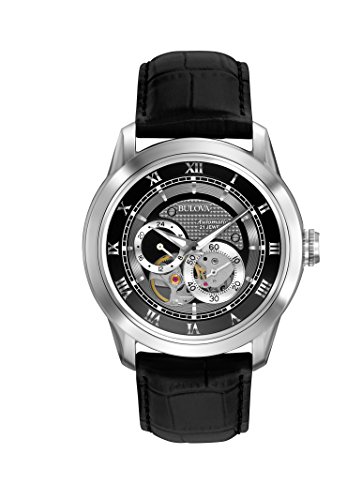
To begin using your timepiece, locate the crown situated on the side of the case. Gently pull it out to the first or second position depending on your model. This action generally engages the movement, allowing the mechanism to start running. If the piece is a quartz model, pressing the crown might be required to initiate the battery’s function.
For automatic timepieces, ensure that you have wound the mechanism adequately. If you haven’t worn it for a while, rotate the crown clockwise while it’s in the first position until you feel some resistance. Doing this helps to charge the mainspring and get the movement started. If your model features a winding rotor, wearing it for a few hours can also suffice.
Once you’ve initiated the movement, set the time accurately by pulling the crown to the second position and rotating it. Ensure you pass through the AM/PM cycle if your model displays a 12-hour format. After adjusting, push the crown back in to seal the water-resistant components and maintain proper functionality.
Activating Your Timepiece
To commence operation, locate the crown on the side. Gently pull it out to the first or second click, depending on the model. This action engages the mechanism.


We recommend setting the time by rotating the crown. Each turn adjusts the hands; counterclockwise typically moves the date forward if equipped.
If your timepiece features solar or kinetic technology, expose it to light or wear it regularly to initiate power generation.
Check the battery compartment if your model requires a new battery. Open the case back with a specialized tool and replace the battery as necessary.
Always refer to the user manual specific to your model for any unique activation procedures or features that may apply.
Understanding Different Types of Wrist Timepieces
Manual mechanisms require winding, typically through the crown. Turn the crown clockwise until resistance is felt, ensuring optimal functioning. These pieces provide a direct connection between the wearer and the device, allowing for personalized winding frequency.
Automatic models self-wind with wrist movement. Wear consistently for 8 to 12 hours to maintain momentum. If inactive for a few days, a manual wind is necessary to reset the timepiece.
Quartz Chronometers
Quartz systems utilize battery power. A simple battery replacement ensures longevity. Most modern quartz pieces display precise timekeeping, with minimal maintenance. Follow the manufacturer’s instructions for battery care to sustain performance.
Smart Devices
Smart timepieces integrate with smartphones through Bluetooth connectivity. Sync the device to receive notifications. Charge regularly and download relevant applications to expand functionality and enhance user experience.
Preparing Your Timepiece for Activation
Ensure the crown is in the proper position to facilitate functionality. For quartz models, check if a battery is installed and correctly inserted. Mechanical variants may require winding to store energy.
For analog styles, pull the crown gently to the second position to set the time, aligning it carefully with the current hour and minute. Digital pieces often have a reset button or mode selection that must be pressed to access configuration settings.
Place the horological device on a stable surface, avoiding any potential impact. This reduces the chance of damage during setup. If there are any protective elements, such as stickers or covers, remove them to ensure all features are accessible without interference.
Charge devices with solar technology or kinetic systems by leaving them in light or movement for a specified period. Review manufacturer guidelines for optimal setup times.
| Watch Type | Preparation Steps |
|---|---|
| Quartz | Check battery installation, ensure proper crown position. |
| Mechanical | Winding may be necessary; consider manual winding for energy storage. |
| Solar | Expose to light for charging; keep in bright conditions temporarily. |
| Kinetic | Move regularly to maintain energy; allow for movement during setup. |
Refer to the instruction manual for model-specific details, ensuring a seamless initialization process. Following these steps can help ensure that your instrument functions correctly once powered on.
Setting the Time and Date Correctly
To configure time and date on your timepiece, follow these precise steps:
Adjusting the Time
- Locate the crown, typically found at the side of the unit.
- Pull the crown gently until you hear a click, indicating it’s in the time-setting mode.
- Rotate the crown clockwise or counterclockwise to set the hour and minutes.
- Push the crown back into its original position to secure the time setting.
Setting the Date
- In the same position as adjusting the time, gently pull the crown halfway out.
- Rotate the crown until the desired date appears.
- Ensure the date changes at midnight by avoiding adjustments between 8 PM and 4 AM.
- Push the crown back to lock the date setting in place.
For timepieces featuring additional complications (like a calendar or moon phase), consult the specific manual for detailed guidance on those functions.
Activating Special Features on Smartwatches
Access the settings menu by swiping down from the main screen. Look for the gear icon, which represents system settings.
To enable health monitoring functions, navigate to the health section and toggle options such as heart rate tracking, sleep monitoring, or step counting. Adjust notification settings in the notifications area to customize alerts for calls, messages, and apps.
Utilize the connectivity options to sync with smartphones via Bluetooth. Make sure the companion app is installed on your mobile device for seamless integration.
Explore fitness modes by selecting the sports section; choose modes like running, cycling, or swimming based on your workout routine. Activate GPS for accurate distance tracking during outdoor activities through the location settings.
For voice commands, enable the assistant feature within the settings. This allows hands-free control for various functions, enhancing usability while on the move.
Regularly check for software updates to ensure all features are functioning optimally and to benefit from new functionalities as they become available. Follow in-app prompts for installation.
Lastly, familiarize yourself with shortcuts and gestures unique to your device, as these can significantly streamline your interaction.
Troubleshooting Common Activation Issues
Ensure batteries are properly installed, aligned with the correct polarity. If using a rechargeable model, verify that it is charged adequately.
If your timepiece has a mechanical winding feature, wind the crown fully to initiate movement.
Check for any obstructive modes like “sleep” or “power-saving,” which can be deactivated through the settings menu or by pressing specific buttons.
A malfunctioning button may be stuck or dirty. Clean the area around the buttons with a soft cloth and ensure they can be pressed easily.
If using a smartphone-connected gadget, re-establish the Bluetooth connection by turning it off and on again. Confirm that the companion application is updated and running.
For analog devices, assess if the hands are blocked by the dial or crystal. Adjust the alignment by gently moving the hands or resetting them if misaligned.
If the display remains unresponsive, consider performing a factory reset as per the manufacturer’s instructions. This step can often resolve software-related glitches.
Refer to the user manual for specific codes or error messages, as some brands may have unique troubleshooting steps for their products.