Ethan Cole

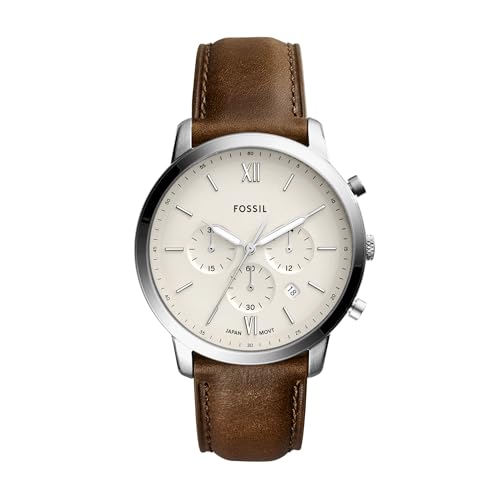
First, locate the crown, often situated on the side of the device. Pull the crown out gently until you hear a click; this generally indicates the setting position is engaged.
Next, rotate the crown clockwise or counterclockwise to maneuver the date indicator. Ensure you advance the timepiece to a point at least a few hours ahead of the desired date. This prevents any potential issues with date change mechanisms.
Once the date aligns with the current day, push the crown back into its original position to finalize the adjustment. Wind the crown lightly if necessary to maintain accurate timekeeping. Double-check to confirm that the change has been executed correctly, as some models may require additional steps for precise settings.


Adjusting the Calendar on Your Timepiece
Begin by ensuring that the crown is in the correct position, usually the second position for calendar changes. Pull the crown gently until you feel a click.
Next, rotate the crown clockwise to move the date forward. It’s crucial to avoid changing the date between 8 PM and 4 AM, as this can damage the mechanism.
If your device features a quick-set function, pulling the crown further out may allow for rapid advancement of the calendar. Spin the crown until you reach the desired setting.
Finally, push the crown back in and turn it clockwise to reset the time if necessary. Ensure the mechanism is functioning correctly by giving it a slight shake or winding it if it is mechanical.
| Step | Action | Notes |
|---|---|---|
| 1 | Pull the crown to the second position | Listen for a click |
| 2 | Rotate crown clockwise | Change the calendar |
| 3 | Use quick-set if available | Aids in faster setting |
| 4 | Push crown back in | Reset time if needed |
Always consult the manufacturer’s manual for specific instructions, as different mechanisms may have unique requirements. Ensure that your timepiece remains in good working order by performing this adjustment with care.
Understanding the Day Adjustment Mechanism
The mechanism behind changing the calendar feature in a timepiece typically involves a series of gears and levers. These components work in unison to transition from one day to the next at the designated time, often around midnight.
First, locate the crown of your timepiece, which allows interaction with the internal movements. Pull the crown to the second click, which often disengages the hour hand but allows manipulation of the calendar feature. Some designs require turning the crown in a specific direction to advance the date.
It’s essential to avoid making alterations during the late hours of the evening–typically between 8 PM and 4 AM–as the internal gears could be engaged in the switching process, leading to mechanical failure or damage.
Regular maintenance ensures that the calendar function operates smoothly. If the feature becomes sticky or unresponsive, consider consulting a skilled technician who specializes in mechanical devices to restore its full functionality.
Familiarizing yourself with your model’s manual can provide additional insights into its unique configuration, enabling a more tailored approach to maintaining the date-changing function.
Tools Needed for Day Adjustment
To modify the calendar function of your timepiece accurately, gather the following items:
Required Instruments
A dedicated case opener is essential for accessing the back of the device. Select a model that suits the type of casing your timekeeper has.
A small screwdriver set allows for the removal of battery compartments or movement covers. Ensure that the screwdrivers fit the screws on your specific model to prevent any damage during the removal process.
Additional Materials
A magnifying glass can aid in inspecting the intricate mechanisms within the timekeeper. This is particularly useful when adjusting delicate components.
Soft cloths or microfiber wipes help in keeping the exterior clean throughout the procedure. Avoid using any abrasive materials that could scratch the surface.
Step-by-Step Guide to Adjust the Day
Begin by locating the crown on the side of your timepiece. Gently pull the crown out to the first click position. This position is typically used for modifying the calendar function.
Rotate the crown clockwise or counterclockwise, depending on the specific model. Keep turning until the correct weekday appears in the designated window. Double-check the current date to ensure alignment with the correct day.
Once the proper day is displayed, push the crown back to its original position to secure any modifications. Observe the mechanism to ensure everything is functioning smoothly without any resistance.
Additional Tips
Avoid making changes around midnight as this may interfere with the internal gears responsible for the date and day transition. Regular maintenance will help ensure the longevity of the timepiece and its accuracy.
Consult the manufacturer’s manual for any unique instructions specific to your model. If the day fails to adjust, it might indicate an underlying issue requiring professional attention.
Common Mistakes to Avoid When Adjusting the Day
Forgetting to set the correct AM or PM time can lead to incorrect date display. Always double-check the time display before making any alterations.
Excessive force while rotating the crown may damage the internal mechanism. Gentle handling is necessary to ensure the longevity of the device.
Failing to familiarize oneself with the model’s specific features can result in improper use. Refer to the user manual for guidelines tailored to the particular model.
Neglecting to position the hands correctly before making adjustments can cause misalignment. Review the current position of the hour and minute hands prior to any setting changes.
Attempting to modify settings during prohibited hours may lead to complications. Typically, the timeframe from 8 PM to 4 AM should be avoided, as this is when the mechanism is engaged.
Ignoring water resistance ratings can cause damage if adjustments are made in wet conditions. Ensure the device is dry to preserve its functionality.
Skimpy understanding of how the adjustment mechanism works may lead to confusion. Take time to learn about the specific features before initiating changes.
Overlooking battery levels might hinder the performance. Regularly check and replace batteries to maintain accurate timekeeping.
Disregarding the importance of a clean environment can cause dirt accumulation. Always perform adjustments in a clean space to prevent contaminants from affecting the inner components.
Troubleshooting Day Adjustment Issues
Check the crown position. If it’s not pulled out to the correct setting, the mechanism may not function, causing complications in the calendar changes.
Inspect the winding. A poorly wound timepiece might not engage the date-change mechanism properly. Ensure the crown is turned appropriately to fully wind the movement.
Common Problems
- Date not changing: This can stem from insufficient winding or a malfunctioning movement. Verify the winding procedure and consult a professional if necessary.
- Incorrect date display: Double-check the AM/PM settings. If the time is set incorrectly, this can lead to a mismatch in dates.
- Stuck date wheel: Debris or internal damage might hinder the wheel’s movement. In such cases, a thorough cleaning or servicing may be required.
Basic Solutions
- Ensure the crown is in the correct position for changing functions.
- Wind the mechanism fully to power the internal components.
- Verify time settings, especially the distinction between AM and PM.
- If issues persist, consult with a skilled watchmaker for further assistance.
FAQ:
How do I adjust the day on my wristwatch?
To adjust the day on your wristwatch, first, locate the crown, which is usually found on the right side of the watch. Pull the crown out to the first or second position, depending on your watch model. Rotate the crown clockwise or counterclockwise until the correct day is displayed. Be cautious; adjusting the day during certain hours, typically between 8 PM and 4 AM, can damage the mechanisms. After setting the correct day, push the crown back in to complete the adjustment and ensure that your watch resumes normal functioning.
What if my watch does not have a crown to adjust the day?
If your wristwatch does not have a traditional crown for adjustments, it may feature a digital display or a smart mechanism. In these cases, refer to the user manual for instructions on setting the day, as the process may involve buttons on the side or touch-sensitive controls. Digital watches often allow for adjustments through a menu system, while some smartwatches sync automatically to your phone’s calendar. Ensuring you are familiar with the specific features of your watch will help you set it correctly.
Why is my wristwatch showing the wrong day, and how can I fix it?
If your wristwatch is displaying the incorrect day, it may need to be adjusted due to the wear of its mechanism or possibly because it has not been set correctly. First, check if the time is accurate, as watches that are significantly fast or slow may also show the wrong day. If the day is off, follow the adjustment instructions from your watch’s manual. If you consistently find that your watch gains or loses time, it could be a sign that it requires maintenance. In such cases, consider taking it to a professional watchmaker for servicing.