Ethan Cole

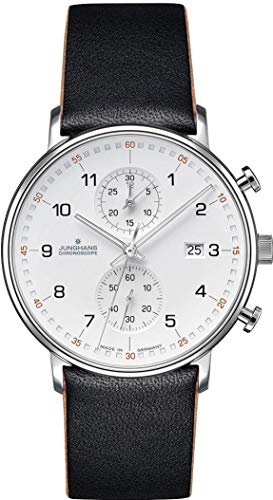
First, locate the crown of your timepiece. Gently pull it out to the position where you can adjust the calendar function, usually one click or pull away from the regular time-setting position. This step is important to ensure you’re modifying the correct setting without affecting the time.
Next, rotate the crown in the appropriate direction. Many models will allow you to turn it clockwise or counterclockwise. Observe the mechanism carefully, as the calendar should change incrementally, moving from the current day to the next. If the movement is sluggish, you may need to adjust your approach or ensure the crown is fully engaged.
Once the correct day is displayed, push the crown back into its normal position to secure the settings. Test the functionality briefly by turning the crown slightly back to see if the change holds. This secures your adjustments, ensuring reliability in the future.


Adjusting the Calendar Function
To set the calendar feature correctly, locate the crown on the side of the timepiece. Pull the crown out to the second position. This typically enables the calendar mechanism.
Steps for Setting the Calendar
- Ensure the timepiece is not displaying a time between 8 PM and 4 AM, as adjustments during this window can harm the internal mechanism.
- Pull the crown to the second position, which allows for calendar modification.
- Rotate the crown clockwise or counterclockwise to alter the calendar display to the desired number.
- After reaching the correct day, push the crown back to its original position, ensuring a proper seal.
Finalizing Time Settings
After adjusting the calendar, it is essential to check the time to ensure accuracy. Pull the crown to the first position to set the correct hour and minute. Verify AM/PM settings if applicable before securing the crown back in place.
Understanding the Mechanism of Your Timepiece’s Chronological Feature
To effectively manage the calendar function of your timepiece, recognizing how the mechanism operates is paramount. Most models utilize a combination of gears and levers that engage with the main movement, which advances the numeral display at precise intervals.
Key Components
- Date Wheel: This part holds the numerals and rotates to display the current day. It is linked to the gear train and progresses every 24 hours.
- Cam and Lever System: A cam system often initiates the shift of the date wheel. As the gears turn, a lever governed by the cam triggers the advancement of the date display.
- Quickset Feature: Featured in many models, this allows for a rapid change of the numeral without needing to rotate the crown multiple times. Engaging this mechanism typically involves pulling out the crown to a specific position.
Maintenance Tips
- Regularly wind the timepiece or ensure it’s maintained within its operational environment to sustain accuracy.
- Handle the crown gently when setting the day. Excessive force can damage the internal components.
- Avoid setting the numeral around midnight to prevent possible damage to the gear train.
Understanding these elements enhances your ability to manage the calendar functionality accurately, ensuring the timepiece serves you precisely as intended.
Step-by-Step Guide to Changing the Date
Pull the crown out to the first or second position, depending on the model. This is crucial for accessing the setting mode. You will typically hear a small click. Ensure that the crown is secure and not fully extracted to prevent accidental changes.
Adjusting the Calendar
Turn the crown clockwise or counterclockwise to set the numerical value. Monitor the position of the hands; avoid changing this setting when the hour hand is near 9 PM to 3 AM to prevent any potential damage to the internal components. Check the mechanism to determine the correct direction of rotation, as it may vary.
Final Steps
Once the desired value is set, push the crown back to its original position until you hear a click. This will lock in the changes made. Confirm that your timepiece shows the correct date by observing its functions over the next few days.
| Position | Function |
|---|---|
| First Position | Setting the calendar |
| Second Position | Time adjustment |
Avoiding Common Mistakes When Setting the Date
Ensure the timepiece is not positioned between 8 PM and 4 AM while modifying the calendar. Adjusting during this period may lead to damage to the internal mechanics.
Before proceeding, confirm if the mechanism requires an AM or PM setting for correct time display. Mistakenly setting the morning and evening can cause the calendar to display incorrectly.
Proper Technique
Always use the designated crown for adjustments. For models with pushers, verify which button corresponds to the calendar function to prevent unnecessary stress on the components.
Checking the Current Date
Before initiating any modification, double-check the current day. Setting it to a date that is already passed can lead to confusion and require further corrections.
After completing the adjustment, observe the transition period once to ensure all functions are operating smoothly. If discrepancies arise, consult the user manual or a specialist for troubleshooting advice.
Resetting the Date After Time Zone Changes
First, ensure your timepiece is set to the correct local time based on the new time zone. Adjust the hour hand without changing the minute hand to avoid disrupting the AM/PM setting.
To correct the calendar function, pull the crown to the second position, which is typically used for setting the time. Rotate the crown clockwise to advance the calendar display. Carefully monitor the transition to ensure you do not skip past the current day.
If the current local time falls between 8 PM and midnight, do not adjust the calendar yet; wait until after midnight to avoid potential mechanical conflicts. This period often engages the internal gears responsible for the date change.
After confirming the calendar shows the correct day, push the crown back to its original position. Follow with a final check of both the hour and minute hands for accuracy. Regularly synchronizing your device with an accurate time source will help maintain precision in multiple time zones.
Regular Maintenance Tips for Your Timepiece’s Calendar Feature
Ensure the longevity of your timepiece’s calendar function by regularly checking the movement and keeping it well-lubricated. Routine servicing every 3 to 5 years is highly recommended.
Store your timepiece in a controlled environment, avoiding extreme temperatures and humidity, which can negatively affect the delicate mechanisms. A protective case can help shield it from dust and moisture.
Clean the case and crystal periodically with a soft, dry cloth to remove any grime or fingerprints. Avoid harsh chemicals that can damage the finish or the internal components.
Monitor the calendar for accuracy. If you notice discrepancies, consult a professional to assess whether recalibration or repairs are needed.
Be cautious when winding the timepiece or pulling the crown. Always follow the manufacturer’s guidelines to prevent accidental damage to the gears associated with the calendar feature.
Utilize a timekeeping app or a reference calendar to ensure precision, especially when adjusting the numerical display. Regular checks can prevent the need for frequent resets.
Lastly, avoid changing the calendar during the hours around midnight, as this can strain the mechanism. Allow adequate time for the gears to settle into their proper positions.