Ethan Cole

To set your timepiece’s calendar, locate the mode button, usually situated on the side. Press the mode button until you reach the calendar setting option, typically indicated by a calendar icon.
Next, enter the adjustment mode by holding the adjust button. The display will start flashing, indicating that it’s ready for modifications. Using the forward and backward buttons, navigate to the month and select the correct one.
Once the month is set, proceed to the day. Again, utilize the navigation buttons to arrive at the correct date. After confirming the day, finalize your adjustments by pressing the adjust button once more, returning you to normal timekeeping mode.

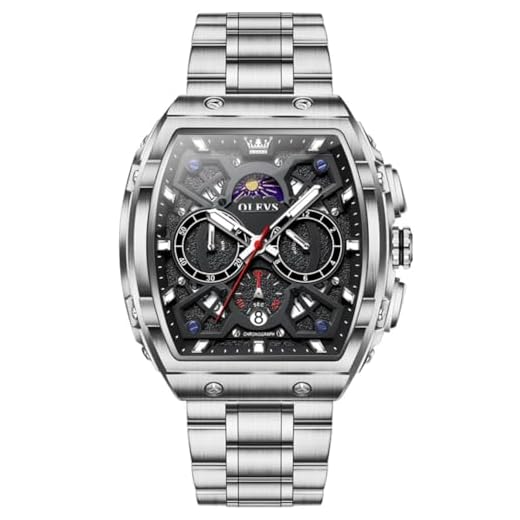
Always double-check the AM/PM indicator to ensure your timepiece accurately reflects the current period. If your model includes additional features like leap year settings, consult the user manual for specific instructions tailored to those functions.
Adjusting the Calendar on Your Timepiece
Begin by pulling the crown out to the second position; this will allow for setting the calendar. Make sure to turn the crown in the direction indicated by your model, which may vary between different pieces.
To increment the calendar, rotate the crown clockwise or counterclockwise depending on your specific model’s design. Watch for the date incrementing correctly; if it does not, ensure that you are in the right position.
When the desired day is visible, push the crown back to its original position. Confirm the change by moving the hands past midnight to ensure the adjustment holds correctly. If adjustments are made close to midnight, wait until the time passes midnight to verify.
Keep in mind that certain models require caution to avoid potential damage. Avoid setting the calendar during the hours around midnight, typically from 8 PM to 4 AM, as this may affect the gears.
Regular maintenance of the timepiece will also aid in keeping the internal mechanisms functioning optimally, ensuring accurate timekeeping and functionality of features.
Identifying Your Casio Watch Model
Locate the model number on the back cover of your timepiece. This number typically consists of a four-digit or five-digit code followed by a letter. For instance, you might see something like “A159WGEA” or “F91W-1”. This specific identifier is crucial for obtaining manuals, guides, or specific advice.
Another avenue is checking the original packaging or paperwork that accompanied your timepiece. They often display the model and other relevant details.
Using the Internet for Identification
Search online using the identified model number. Many websites provide detailed specifications, features, and sometimes instructional content tailored to your particular model.
Forums and groups dedicated to horology can also be valuable; members may have experience with your specific watch and can offer insights.
Utilizing the Casio Website
Visit the official Casio website. A dedicated section often allows users to input their model details for support and resources. This can be beneficial for troubleshooting or getting precise information for maintenance.
| Model Identification Method | Description |
|---|---|
| Back Cover Number | Locate the model number on the reverse side of the timepiece. |
| Original Packaging | Check the box or documentation that came with the watch. |
| Online Search | Use the model number to seek forums or websites for details. |
| Official Website | Access Casio’s website for dedicated support or manuals. |
Understanding the Watch’s Crown Functions
The crown on your timepiece serves multiple purposes, essential for proper operation and adjustment. It typically has three main positions: winding, time setting, and often a third for adjusting other functions, depending on the specific model.
Winding
In the first position, you can wind the mechanism. For automatic variants, a few twists may suffice to start the movement, while for quartz models, a gentle pull to this position might suffice only for altering time settings rather than winding.
Time Adjustment
The second position allows for setting the hour and minute hands. Pull the crown gently to this notch; you will feel a click. Rotate clockwise or counterclockwise to modify time accurately. Some models may feature an additional adjustment for seconds, guiding synchronization with standard time signals.
Always ensure the crown is pushed back to its original position after adjustments to maintain water resistance and prevent dust entry.
Setting the Time Before Changing the Date
Ensure the hour and minute hands reflect the correct time before adjusting the calendar feature. Pull the crown of the timepiece until it clicks to the second position, which allows for adjusting the hour and minute. Rotate the crown to set these elements accurately.
For watches with an analog display, advance the hands until they surpass the 12 o’clock position to prevent calendar misalignment. After confirming the time is precise, return the crown to its original position and secure it fully. This practice helps avoid potential complications when moving to alter the calendar settings.
Upon establishing the correct time, proceed to the next stage for adjusting the calendar. If unsure, consult the specific manual associated with your timepiece model for detailed instructions tailored to your model’s functionalities.
Adjusting the Date Step-by-Step
Pull the crown to the first position, which usually sets the hours and minutes without affecting the calendar. Rotate clockwise until the desired month appears on the display.
Move to the next position by pulling the crown further out. This enables the modification of the numerical display. Rotate until the appropriate day is visible.
Ensure that the time is correctly set to PM or AM to avoid discrepancies between the hours and the calendar. For models with a 24-hour display, observe the indicator to confirm the right setting.
Once adjustments are complete, push the crown back to its original position to secure the settings. Verify the accuracy by observing the calendar transition at midnight.
Common Mistakes to Avoid When Adjusting the Calendar
Avoid setting the time to a point between 8 PM and 4 AM, as this can interfere with the internal mechanism, leading to potential damages.
Incorrect Use of the Crown
- Do not pull the crown too far; this can lead to incorrect settings or damage.
- Make sure to understand the positions: winding, time setting, and calendar setting functions.
Forgetting to Reset to Normal Position
- Always return the crown to its original position after adjustments. Failing to do so can affect water resistance features.
- If the time is not set properly after adjustments, additional complications may arise.
Check the instruction manual specific to the model to avoid confusion and ensure proper handling of the settings mechanism.
Resetting the Watch If Incorrect Date Is Set
If the current setting shows an incorrect calendar, follow these steps to rectify it effectively.
Steps to Reset
- Locate the crown on the side of the timepiece.
- Pull the crown out to the second or third position, based on your model’s specifications.
- Turn the crown to advance the mechanism to the next month or year until the correct month is displayed.
- Push the crown back in gently and then pull it out again to adjust the hours and minutes, ensuring that the time corresponds accurately.
- Once adjusted, press the crown back in to complete the process.
Final Check
After advancing the mechanism, verify that the readings on the display match with the actual time and calendar. If discrepancies persist, repeat the steps to ensure accuracy.
Regular maintenance of the mechanism can prevent future complications with settings. If problems continue, consider consulting the manual specific to your model or reaching out to professional service for assistance.