Ethan Cole

To accurately set the calendar on your timepiece, pull the crown out to the first or second position, depending on the model. Rotate the crown gently in the clockwise direction to advance the numerical display to the desired day. Ensure that you stop before reaching the end of the month to avoid potential damage to the mechanism.
For models featuring a quick-set function, simply pull the crown to the correct position and adjust it to the correct day swiftly. Be cautious not to change the settings during the hours of 8 PM to 4 AM to protect the internal gears from damage caused by overlapping mechanisms.
After successfully adjusting, push the crown back in to ensure that the settings are locked in. Regular checks on the accuracy of your timepiece can help maintain its precision and extend its lifespan.


Understanding Your Fossil Watch Model
Identify your specific model by locating the serial number, often found on the back case. This number provides essential details regarding features, size, and recommended maintenance.
Refer to the official Fossil website or user manual for model-specific instructions. Each variant comes with unique functionalities, including water resistance ratings and complications.
Combine functionalities with aesthetic appeal; some models feature interchangeable straps. Understanding the design helps in effectively maintaining your timepiece’s look and feel.
Familiarize yourself with features like chronographs, alarms, and calendar functions present in certain models. Proper knowledge ensures optimal use and extends the life of your accessory.
Locating the Date Adjustment Crown
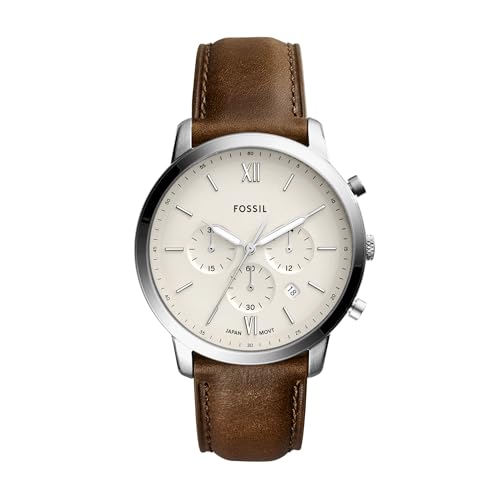
The date adjustment mechanism is usually situated on the side of the timepiece. Look for a small crown, which is generally operated by pulling it out to different positions. The first position often sets the time, while the second position is designated for adjusting the calendar feature.
Steps to Identify the Crown
Examine the side of the case closely. The crown will typically be located at the 3 o’clock position, unless the model indicates otherwise. Confirm that it is not a secondary push-button, which may be present on some designs. If you find it challenging to differentiate, refer to the user manual or online resources for your specific model.
Table of Common Crown Positions
| Watch Model | Crown Position |
|---|---|
| Minimalist Series | 3 o’clock |
| Chronograph Line | 2 o’clock |
| Classic Collection | 3 o’clock |
| Sport Edition | 4 o’clock |
| Luxury Range | 3 o’clock |
After locating the crown, gently pull it out to the designated position needed for adjustments, and be cautious with excessive force to avoid damaging the mechanism.
Pulling the crown to the correct position
Gently grasp the crown and pull it out to the first notch. This position allows you to adjust the calendar feature without affecting the time settings. Ensure that you do not pull it further to avoid changes in the hour or minute hands.
Once in the correct notch, turn the crown clockwise to advance the numerals. Each complete turn will shift the display ahead by one day. Watch for the transition between days, as this might change around midnight.
To finalize adjustments, push the crown back into its original position securely. This action will lock your adjustments in place, ensuring accurate tracking of the calendar.
Adjusting the date accurately
Ensure the crown is not pulled out too far; this can lead to complications. The pulling position must be correct for precise adjustments. Pay attention to AM and PM variations when setting the numeral.
Steps for accurate adjustment
- Align the marker on your dial with the current hour to determine AM or PM.
- Advance the crown one click to reach the date setting position.
- Rotate the crown until the desired numeral displays, being cautious about the transition between months.
- Check if the numeral changes at midnight; if not, consider adjusting the PM position in the previous step.
Common pitfalls
- Setting around midnight can cause errors; prefer to set in the early morning.
- For models with quickset functionality, avoid using the hour hand for manual date progression.
- Always return the crown to its original position after adjustments to maintain water resistance.
Maintaining these practices will ensure your timepiece displays the right details without errors. Consult your model’s manual for specific features that might affect functions during setup.
Resetting the Crown and Checking the Time
Before adjusting your timepiece, ensure the crown is fully reset. Push it back in after completing the previous adjustments to ensure the mechanism is ready for accurate timekeeping.
To verify the accuracy of the time, pull the crown gently to its second position. This action stops the second hand, allowing for precise time setting. Adjust the hour and minute hands accordingly, observing the indicator for clarity.
Follow these steps:
- Carefully pull the crown to the second notch.
- Set the hands to the desired time, ensuring AM or PM distinctions are correct.
- Push the crown back in to resume normal activity.
To double-check the time, reference another reliable clock. If any discrepancies arise, repeat the process until synchronization is achieved. Regularly checking the time against an authoritative source is advisable for maintaining accuracy.
Troubleshooting Common Adjustment Issues
If the calendar feature isn’t shifting smoothly or getting stuck, ensure the crown is fully engaged in the correct position. Pulling it out too far might disable functions, leading to confusion.
Stuck Mechanism
If the adjustment stem feels jammed, a gentle rotation while slightly pulling may help alleviate tension. Avoid using excessive force, which can damage internal gears.
Incorrect Display
Double-check settings; if the numeral shown does not match expectations, confirm that AM/PM indicators align properly, especially if the time is set close to midnight. Adjust accordingly to ensure accuracy.
FAQ:
How do I change the date on my Fossil wrist watch?
To change the date on your Fossil wrist watch, first pull the crown located on the side of the watch out to the first or second position. The first position typically allows you to adjust the date, while the second position lets you set the time. Once the crown is in the correct position, turn it clockwise or counterclockwise until the desired date appears in the date window. After adjusting, push the crown back in to its original position to finalize the setting.
Why is my Fossil watch not changing the date?
If your Fossil watch is not changing the date, the issue could be related to the time setting. Ensure that the watch is set correctly, as some models require the time to be set past midnight to change the date properly. Additionally, a dead battery may prevent the watch from functioning correctly. If it’s a mechanical watch, check if it is properly wound. If the problem persists, consider visiting a watch repair professional.
Is there a specific time I should change the date on my Fossil watch?
It’s recommended to change the date on your Fossil watch when the time is between 9 PM and 3 AM. Setting the date during this time can prevent damage to the watch’s movement, as many watches have a mechanism that is engaged during these hours to switch the date. If you accidentally attempt to change the date during this period, it could lead to malfunctioning of the date-setting feature.
How often should I change the date on my Fossil watch?
You should change the date on your Fossil watch every day, particularly if it doesn’t have an automatic date feature. Some watches come with a perpetual calendar that can automatically adjust the date, but most standard models will require manual adjustment at the end of each month with fewer than 31 days. Regularly checking and adjusting the date ensures that your watch remains accurate.
What should I do if my Fossil watch is stuck while changing the date?
If your Fossil watch is stuck while trying to change the date, do not force the crown as it may cause damage. Instead, gently try to rotate the crown in the opposite direction to see if it resets. If this doesn’t work, push the crown back to its normal position and try again. If the issue continues, the watch may require professional examination to address internal problems.