
 Ethan Cole
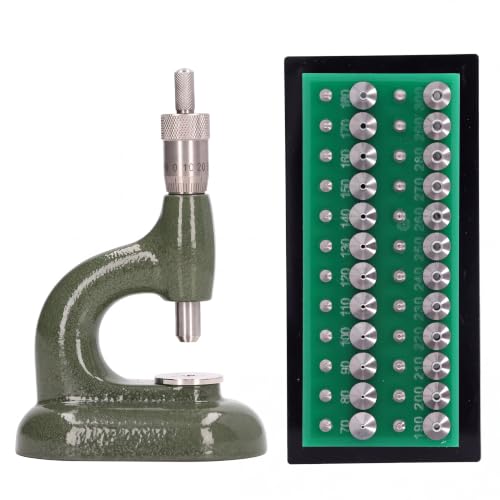
Begin with replacing the battery if your timepiece has stopped. Locate the back cover, which may be a snap-on or screw-down style. If it’s a snap-on type, use a plastic tool to avoid scratches and gently pry it open. For a screw-down case, use a screwdriver designed for small electronics.
Once the back is removed, take out the old battery, noting its orientation to install the new one correctly. Ensure the replacement battery matches the specifications of the original. After inserting the new power source, replace the cover securely.


If the device still does not function, inspect the contacts and clean them with a cotton swab dipped in isopropyl alcohol. Dirt and oxidation can disrupt electrical connections. After cleaning, reassemble the casing and check whether the mechanism is operational.
In case of persistent issues, consider assessing the movement. Dust particles may hinder functionality. For this, carefully disassemble the timekeeping mechanism, clean each component with care, and reassemble them precisely. Regular maintenance can extend its lifespan significantly.
Lastly, if you encounter difficulties during any step, consult the user manual specific to your model for additional guidance. Troubleshooting can prove straightforward with the right information and approach.
Repairing Your Timepiece
Check the battery first. If your timepiece has stopped functioning, replacing the battery can often solve the issue. Use a small screwdriver to open the back cover carefully. Ensure the replacement battery matches the specifications outlined in the manual or on the battery itself.
Adjusting the Time and Date
For models with timekeeping inaccuracies, try resetting the time and date settings. Pull the crown out to the time setting position and turn it to adjust the time. Make sure to align the date correctly, especially through transitional periods like midnight.
Cleaning the Exterior
To maintain the appearance, clean the casing and strap with a soft cloth. For dirt accumulation, a mixture of mild soap and water can be used, but avoid getting moisture into the case. Rinse with a damp cloth and dry immediately to prevent water damage.
Identifying Common Problems with Casio Watches
Begin by observing the display; a blank or fading screen often indicates a depleted battery or connection issue. Remove the back cover and check if the battery needs replacement.
In cases of timekeeping errors, verify that the time is set correctly. Misalignment or incorrect settings can lead to inaccurate readings. Adjust using the designated mode button.
Inspect for physical damage. Cracks on the glass or casing can result in moisture ingress, compromising functionality. If evident, replacing the damaged components is advised.
For models equipped with features like alarms or timers, confirm they are enabled and appropriately set. If alarms fail to sound, battery power or internal speaker issues might be the cause.
Examine for strap integrity. A worn-out or failing band can obstruct normal use. Consider replacing it to restore comfort and stability.
Check for signs of condensation under the glass, which could indicate seal failure. In this instance, having a professional service the unit ensures moisture is eliminated.
For inaccuracies in the chronograph function, ensure all buttons are functioning and not stuck. This may require disassembling to address internal issues.
Replacing a Dead Battery in Your Casio Timepiece
To replace the battery, gather the following tools: a small screwdriver, tweezers, and a new battery that matches your model. Ensure you work in a clean, well-lit environment.
Steps to Replace the Battery
- Remove the case back: Use the screwdriver to gently pry off the back cover. Be cautious to avoid scratching the surface.
- Identify the battery: Look for the battery compartment. Note the orientation and type of battery used.
- Remove the old battery: Using tweezers, carefully lift the old battery out of its compartment. Dispose of it properly.
- Insert the new battery: Place the new battery into the compartment, ensuring the correct orientation. It’s usually marked with a “+” and “-” symbol.
- Reattach the case back: Press the cover back into place until it clicks, ensuring it’s secured properly.
- Test the timepiece: Adjust the settings and verify that the display is functioning correctly.
Tips for Maintenance
- Replace the battery every 1-3 years to prevent leakage and ensure optimal performance.
- Avoid exposing the timepiece to extreme temperatures during battery replacement.
- Use a soft cloth to clean the exterior regularly, ensuring clarity and shine.
Adjusting the Strap on Your Watch
To resize the strap, determine whether it has removable links or is made of fabric. For metal bracelets, locate the small pins securing each link. Use a pin removal tool or a small screwdriver to remove these pins carefully.
For Metal Straps
- Identify the number of links to be removed based on your wrist size.
- Work on a clean, flat surface to prevent losing small pieces.
- Insert the tool into the hole of the link pin and push it out gently.
- Once you’ve removed the necessary links, reattach the strap by securing the remaining links with the pin.
For Fabric Straps
- Locate the adjustment holes along the strap.
- Pull the end of the strap to the desired hole and insert the buckle.
- Ensure the strap fits snugly but is not too tight to avoid discomfort.
After adjusting, wear the timepiece for a while to check for comfort and fit. Double-check that all pins and buckles are secure before regular use.
Troubleshooting Display Issues on Digital Timepieces
If the display becomes unresponsive or shows unusual characters, the first step is to reset the unit. Look for a small reset button, usually located on the back or side of the device. Using a pin, press and hold the button for a few seconds to restart the display.
Common Display Problems
A series of issues may arise with the display. Below are frequent occurrences along with their solutions:
| Issue | Possible Cause | Solution |
|---|---|---|
| Blank Display | Dead battery | Replace the battery, ensuring correct orientation. |
| Display Flickering | Loose connection | Check internal connections, ensure no wires are frayed. |
| Inconsistent Readings | Software glitch | Perform a soft reset and update firmware if applicable. |
| Characters Displayed Incorrectly | Corrupted display | Replace the display unit if malfunction persists after reset. |
Performance Enhancement Tips
To maintain optimal operation of the screen, avoid exposure to excessive moisture and extreme temperatures. Regularly clean the surface with a soft cloth to prevent buildup of dirt or smudges, which can interfere with visibility.
Repairing Water-Resistant Features in Timepieces
Check the rubber gaskets and O-rings consistently as they are integral for maintaining water resistance. If these components appear worn or damaged, replace them promptly to prevent water ingress.
Testing Water Resistance
To verify the integrity of the water-resistant qualities, subject the item to a simple water test. Immerse the device in a bowl of water for a short duration. If bubbles escape, an issue exists. In such cases, a professional water resistance test is advisable.
Sealing the Case Back
Ensure the case back is properly sealed after battery replacement or repairs. Use a case back tool to tighten the back cover securely, which will help maintain the intended water-resistant features. Additionally, apply a small amount of silicone grease to the gaskets for enhanced sealing prior to assembly.
Restoring Functionality After a Fall or Impact
First, check for visible damage on the exterior. Look for cracks on the glass or casing that may require replacement.
Next, assess the internal components. If the mechanism has been dislodged, carefully open the back cover to inspect for loose gears or misaligned parts. Ensure that all components are seated properly within their designated places.
If the timekeeping is erratic, a recalibration might be necessary. Reset the time and dates, following the specific button patterns for your model found in the user manual.
If the piece has stopped functioning entirely after a fall, consider replacing the battery. Even if the battery was recently changed, the impact may have caused a connection issue preventing power from reaching the movement.
Inspect the crown and pushers. Ensure that they move freely and return to their original positions, as an impact can occasionally jam these components.
Finally, after completing the checks, test the functionality by wearing the piece for a short period. Monitor its accuracy and ensure all features, such as alarms and timers, operate correctly. If problems persist, professional servicing may be needed to address more complex internal damage.



