
 Ethan Cole

To synchronize your timepiece accurately, initiate by locating the adjustment crown, typically found on the right side of the casing. Pull out the crown gently to the first click, which usually sets the date. For precise hour and minute settings, pull it to the second click.
Next, rotate the crown in the designated direction to set the hands. Ensure the time is set according to AM/PM distinction; this is often crucial for models displaying a 12-hour format. To finalize, push the crown back into its original position to resume normal function.
If your model features a light function, activating it can assist in reading in low-light situations. Regularly check for battery life; a diminishing power source may affect time accuracy. Periodic maintenance, such as cleaning the casing and ensuring the water resistance, will prolong your timepiece’s lifespan significantly.
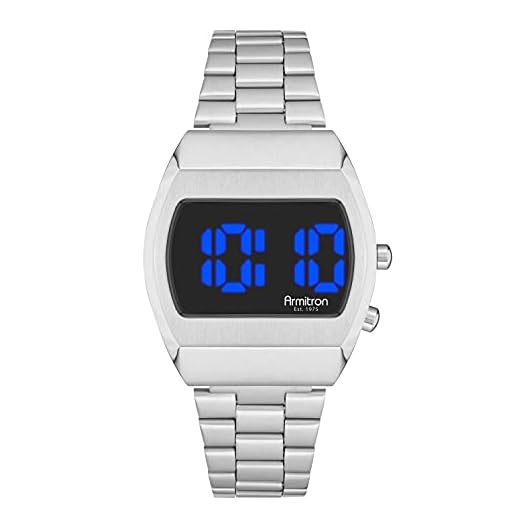

Understanding the Basic Functions of Your Armitron Timepiece
Familiarize yourself with the following key features of your timepiece:
- Analog Display: If your model includes an analog face, notice the hour and minute hands for reading standard hours. Some have a second hand for precise counting.
- Chronograph: Enables timing events accurately. Activation typically involves pressing a button, starting and stopping the stopwatch function.
- Alarm Function: Set to notify you at designated times. Look for a dedicated setting button, follow the sequence to establish the alarm.
- Backlight: Use this feature for visibility in low-light conditions. Activating it usually requires pressing a specific button.
- Water Resistance: Check the specifications for depth ratings. It’s crucial to understand your model’s limits to maintain its functionality.
Refer to the instruction manual for detailed descriptions and instructions tailored to your specific model. Understanding these functions enables optimal utilization and enhances your experience.
Setting the Time Accurately on Your Timepiece
To adjust your timepiece accurately, locate the crown, typically found on the side of the casing. Gently pull the crown out to the second position–this will allow for time changes without affecting the functions.
Adjusting the Hour and Minute
Once the crown is in the second position, turn it in a clockwise or counterclockwise direction to set the correct hour and minute. For models with a 24-hour format, ensure that you are adjusting it according to the correct time notation.
Finalizing the Setting
After setting the desired hour and minute, push the crown back to its original position. This will lock in your adjustments. Make sure to check the accuracy within the next few days and readjust if necessary.
Keep in mind that some variations may depend on the specific design and features of your model, so consult the user manual for additional details if needed.
Adjusting for Daylight Saving Time
To modify your timepiece for Daylight Saving Time, locate the crown on the side. Pull the crown out to the second position, which typically allows for minute adjustments. Rotate the crown clockwise until the hour hand reflects the correct adjustment, usually adding one hour.
Ensure that the minute and second hands remain synchronized. Push the crown back to its original position once the adjustment is complete, securing the settings. Double-check for accuracy by comparing your device with another reliable reference.
For models equipped with multiple functions, navigate through the settings to confirm that any additional features remain aligned after adjusting the standard hour. If your device displays the date, verify it is correctly updated as well, since some models may require manual correction.
Maintaining Your Timepiece for Accurate Functionality
Regular battery replacements ensure uninterrupted operation. Depending on the model, batteries should be changed every 1 to 3 years. Monitor for signs of battery depletion, such as dimming displays or erratic behavior.
Periodic cleaning removes debris and moisture that can affect mechanisms. Utilize a soft cloth for external surfaces. Avoid harsh chemicals; a damp cloth with mild soap suffices.
For analog models, keep the crown and case sealed to prevent dust and water ingress. If exposed to moisture, dry the exterior promptly to prevent internal damage.
Calibration Checks
Conduct monthly checks against a reliable standard, adjusting as necessary. If deviations occur regularly, consult a professional for potential repairs or calibration services.
Storage Recommendations
Store in a cool, dry environment away from direct sunlight. Consider using a dedicated case to prevent scratching and impact damage.
Replacing the Battery in Your Armitron Timepiece
To ensure your timepiece functions optimally, replacing the battery is crucial. Follow these steps:
| Step | Description |
|---|---|
| 1 | Gather necessary tools: a small screwdriver, a replacement battery (typically type SR626SW or equivalent), and a soft cloth. |
| 2 | Clean the area where you’ll be working to prevent dirt and debris from entering the casing. |
| 3 | Using the screwdriver, carefully remove the back cover of the case. Some models may have screws, while others may require prying gently. |
| 4 | Note the orientation of the old battery before removing it. This will be important for installing the new one. |
| 5 | Replace the old battery with the new one, ensuring it is oriented correctly to make proper contact. |
| 6 | Reattach the back cover, ensuring a secure fit to prevent moisture and dust ingress. |
| 7 | Test the functionality of the timepiece to confirm the new battery is working. Adjust settings if necessary. |
Dispose of the old battery in accordance with local regulations to minimize environmental impact.
Troubleshooting common timekeeping issues with Armitron watches
If your timepiece is not displaying the correct hour or minute, consider the following steps:
Check the Battery
- Determine if the battery needs replacement by observing any dimming or flickering of the display. Replace old batteries promptly.
- Use only high-quality batteries recommended for your specific model to ensure longevity.
Examine for Magnetism
- Keep your device away from strong magnetic fields, as they can interfere with the internal mechanisms.
- If exposure has occurred, gently tap the side of the case with the back facing your palm to realign components.
Inspect for Moisture
- Condensation or fogging inside the crystal may indicate water damage. Immediate action is necessary.
- If moisture is detected, remove the battery and let it dry completely before reassembling.
Ensure Calibration Accuracy
- Test the accuracy by comparing the watch with a reliable time source over a period of 24 hours.
- If discrepancies are noted, follow recalibrating instructions based on your specific model.
By addressing these issues, you can enhance reliability. If problems persist, consider seeking professional servicing for a thorough examination.



