Ethan Cole
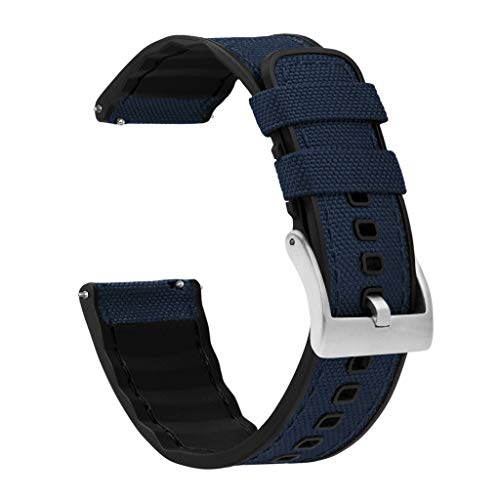
To initiate the modification of your accessory, first, ensure you have a compatible replacement option on hand. This can significantly enhance your device’s appearance and comfort.
Select a suitable tool, such as a small pin or a specialized removal tool, to efficiently detach the current strap. Locate the spring bars positioned at the junction where the strap meets the casing. A gentle press on the spring bar mechanism will allow for easy disengagement.
When attaching the new strap, align it correctly with the casing. Ensure it clicks into place to guarantee a secure fit. Double-check that both ends are firmly seated and that the strap has the necessary flexibility for daily wear.
Once the accessory is customized, consider adjusting the length for optimal comfort. If necessary, use additional links or remove excess material to achieve your perfect fit. Personalizing your smart timepiece can elevate both its style and wearability.
Instructions for Swapping Out the Strap on Your Device
Begin with locating the quick-release pin on either side of the strap. Press the pin inward using a narrow tool or your fingernail to disengage the strap from the watch case.


Once detached, you can select a new strap. Ensure compatibility with your device model to avoid fitting issues.
Align the new strap with the attachment points on the watch case. Gently slide one end of the strap into the slot until you hear a click, indicating a secure fit.
Repeat the process on the opposite side, ensuring both ends are firmly attached.
Finally, ensure the strap is adjusted for comfort on your wrist. Test the fit and make any necessary adjustments by moving the clasp or buckle.
For a secure experience, regularly check the attachment of the straps to prevent accidental detachment.
- Tools needed: narrow tool or fingernail
- Check compatibility for new strap
- Adjust for comfort after installation
Choosing the Right Replacement Band
Select a material that suits your lifestyle. Silicone is ideal for workouts, while leather adds elegance for formal occasions. Stainless steel offers durability combined with a polished look.
Measure your existing strap width to ensure compatibility. Most bands come in standard sizes, typically 20mm, 22mm, or 24mm. Check user reviews to assess comfort and quality of different options.
Color is a key factor; consider coordinating with your wardrobe or mood. Neutral shades offer versatility, while bright colors can add a personal touch. Patterns may also enhance your style.
Ensure the new strap features secure attachments. Look for bands that utilize a pin-and-tuck mechanism for added safety. Magnet closures can offer convenience, but assess their reliability for daily wear.
Inspect maintenance requirements. Some materials, like leather, demand care to remain in good condition, while silicone bands are generally easy to clean. Choose based on your willingness to maintain the item.
Think about the ease of swapping straps. Quick-release pins can simplify changing bands for different occasions, enhancing versatility.
Preparing Your Galaxy Watch for Band Replacement
Ensure your device is powered off before initiating any modifications. This reduces the risk of accidental touches during the process.
Gather necessary tools, including:
- Spring bar tool
- Soft cloth or surface to protect the screen
- Replacement accessory
Place the timepiece face down on a soft cloth to prevent scratches. This positioning safeguards the screen while you work.
Examine existing connectors for any debris. Clean these areas with a soft cloth to ensure smooth removal and installation.
Check the compatibility of the new accessory with your device model to avoid issues during installation. Refer to the manufacturer’s guidelines for specific dimensions.
Removing the Old Wrist Band Safely
To detach the existing strap from your device, locate the small release button on the back of the casing. Press this button firmly while gently sliding the strap outwards. Ensure you are handling the watch carefully during this process to avoid damage.
Utilize a plastic tool, if available, to assist with the removal. This can prevent scratches on the surface of the device. Always work on a soft and clean surface to protect the watch from unintended drops.
Check for any wear or debris around the attachment points before proceeding. If there is any residue, clean it gently with a microfiber cloth to maintain the integrity of both the device and the new attachment.
Refer to your user manual if unsure about specific instructions for your model, as different designs may have slight variations in the detachment mechanism.
| Step | Action |
|---|---|
| 1 | Locate the release button on the back. |
| 2 | Press the button while sliding the strap out. |
| 3 | Use a plastic tool if needed to prevent scratches. |
| 4 | Clean the attachment area before installing the new strap. |
| 5 | Consult the user manual for model-specific instructions. |
Attaching the New Wrist Band Correctly
Align the connector pins of your new strap with the slots on the casing. Ensure that the pin side faces the body of the device for proper fitting. Gently push the strap into position until you hear a click, indicating secure attachment.
Check both ends to confirm that they are firmly affixed. Test the connection by gently pulling on each side to ensure stability. If either side feels loose, detach it and reinsert until properly seated.
Angle adjustments may be necessary for optimal comfort. Rotate the band slightly to ensure it sits correctly on your arm without pinching or sliding. Make sure both ends have an equal fit to prevent any imbalance while wearing.
Finally, examine the alignment of the strap with the device face. A snug fit not only enhances comfort but also ensures that sensors and features remain unobstructed for accurate functionality.
Securing the Band to Prevent Accidental Detachment
Ensure a tight fit using the provided spring bars. Inspect the ends of the new strap; align them carefully within the lugs. Firmly press until you hear a click, indicating secure placement. Verify stability by gently tugging on the strap to confirm it doesn’t wobble.
Consider utilizing additional locking mechanisms if available. Some alternatives offer innovative clips or locking systems for extra security. These features can significantly reduce the risk of unintended releases during daily activities.
Regularly check connections for any signs of wear or looseness. Replace any damaged components immediately to maintain integrity. Additionally, keep the attachment points clean to avoid debris buildup, which may hinder secure fastening.
Finally, invest in quality materials. Higher-grade straps typically offer better longevity and a reliable fit. This can contribute to minimizing risks associated with detachment.
Maintaining Your New Strap for Longevity
Regular cleaning is crucial. Wipe the strap weekly with a soft, damp cloth to remove dirt and sweat. For silicone options, a mild soap solution suffices. Leather alternatives may require specialized leather cleaners.
Avoiding Excessive Moisture
Limit exposure to water, especially with leather materials. When swimming or exercising, consider using an alternative that’s water-resistant to prolong the life of your primary accessory.
Proper Storage Techniques
When not in use, store the strap in a cool, dry place away from direct sunlight. Avoid folding or compressing it to prevent creases and damage.