
 Ethan Cole

To correctly synchronize your Timex timepiece, locate the crown situated on the right side. Pull it out gently to the first click; this action prepares the watch for adjustment. Be mindful that turning the crown while in this position allows you to navigate through the hours and minutes.
For precision, ensure that you rotate the crown clockwise or counterclockwise as required. When the correct minute is displayed, push the crown back to its original position to finalize the process. Always check if the second hand aligns through the synchronized motion.
If your model features a date function, pull the crown to the second click to adjust the date. Rotating clockwise will advance the calendar, while rotating counterclockwise will change the time of day. After adjustments, secure the crown back into place to maintain water resistance and protect internal mechanics.
Adjusting the Time on a Timex Timepiece
Begin by pulling the crown out to the first or second position, depending on the model. This action halts the second hand, ensuring accurate alignment with the minute hand. Rotate the crown clockwise or counterclockwise to modify the hours and minutes accordingly.
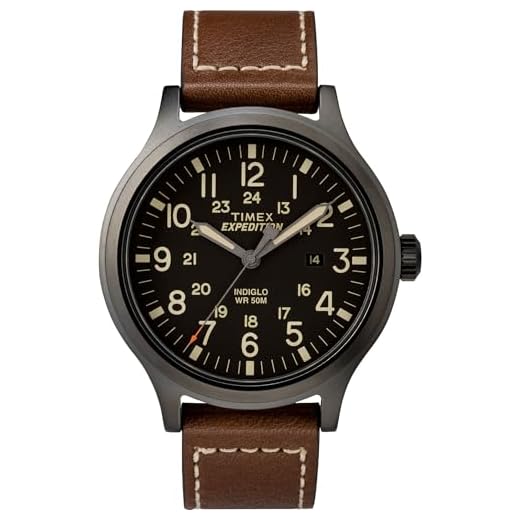

If your model features a date function, be cautious to avoid changing the date while the hour hand is between 9 PM and 3 AM, as this could damage the mechanism. It’s recommended to set the hands past 12 before adjusting the date.
After achieving the desired settings, push the crown back to its original position to resume regular function. Check the accuracy after a few hours to confirm that adjustments were successful.
For models with features such as an alarm or chronograph, consult the specific manual for additional instructions on operating these functionalities without affecting standard timekeeping.
Understanding Your Timex Watch Model
Identify the specific model by checking the back of the timepiece for model numbers or name engravings. Refer to the Timex official website or product manuals for detailed specifications and functionalities unique to your model.
Familiarize yourself with the various functions of your piece, as each variant may have different features like alarms, timers, or special modes. Understanding these capabilities ensures effective use and enhances your overall experience with the product.
Explore the user manual, which provides critical insights into the correct operation and maintenance practices specific to your model type. Manuals often include troubleshooting tips, ensuring longevity and optimal performance.
Research common issues related to your specific model. Online forums or customer reviews can reveal insights about known challenges and successful solutions shared by fellow users.
Take note of the watch’s battery type, as it varies between models. Knowing the battery specifications aids in timely replacements, ensuring continuous functionality.
Consider the materials used in your model, such as the case and strap composition. Understanding care requirements for different materials can prevent damage and maintain the aesthetic appeal of your device.
Stay informed about warranty details. Some variations come with limited warranties that cover specific malfunctions within designated periods, providing peace of mind for your investment.
Locating the Time Setting Crown
Identify the crown on your device, typically situated on the right side of the casing. This small knob varies slightly in shape but is generally round or oval. Some models may highlight the crown with specific textures or colors.
Check if the crown has two functional positions. The outer position is primarily used for adjustment, while the inner position often serves for winding. Gently pull the crown to the first or second click to initiate adjustments.
In some configurations, crowns might be recessed or feature a protective guard–be cautious while handling these. If the crown seems difficult to reach, consider using your fingernail or a small tool for assistance.
If you’re uncertain, consult the user manual for your specific model, as crown placement may differ slightly across various iterations. Familiarizing yourself with this element is crucial for accurate modifications.
Adjusting the Time: Step-by-Step Instructions
1. Pull the crown out gently until you hear a click. This position usually allows for adjustment without affecting other functions.
2. Rotate the crown clockwise or counterclockwise to change the hour or minute as needed. Ensure that hours and minutes are set correctly to avoid confusion.
3. Pay attention to AM/PM indicators if applicable. Adjust accordingly to distinguish between morning and afternoon/evening times.
4. Once the desired settings are achieved, push the crown back in until it clicks into the original position to secure your adjustments.
5. For models with a date feature, repeat similar steps to adjust the date. Ensure you do not set the date during hours when the mechanism is engaged (typically between 9 PM and 3 AM).
Additional Tips
- Keep your device away from extreme temperatures when adjusting.
- Use a soft cloth to wipe the crown periodically to prevent dirt build-up.
Final Checks
Verify the adjustment by observing the watch’s operation after several minutes. Confirm that the watch stably reflects the correct hour, minute, and date.
Switching Between Time Zones on Timex Watches
To change time zones on your timepiece, first locate the crown, which is usually on the side. Pull it gently to the first position. This allows adjustment without affecting the current local time.
Next, rotate the crown clockwise or counterclockwise to navigate through the available time zones. Pay attention to the hour display, ensuring you align it with your desired zone. Some models may have a quick-adjust feature, which lets you skip ahead by increments, simplifying the process.
Final Adjustments
After reaching the preferred zone, push the crown back to its original position. This will lock your selection in place. Check the display to confirm that the hour reflects accurately based on your location.
Additional Features
For models with daylight saving options, consult the manual for specific instructions on enabling or disabling this setting, as it may vary. Refer to your specific model’s guidelines for any unique procedures related to multiple time zone management.
Common Troubleshooting for Time Setting Issues
If the adjustment mechanism is unresponsive, verify that the crown is fully engaged in the correct position. Ensure you’re pulling it out to the right notch; some models may have multiple settings that influence its function.
In cases of incorrect display after adjustment, check for potential AM/PM confusion. Many timepieces distinguish between morning and evening settings, which can lead to a 12-hour discrepancy.
For pieces featuring multiple time zones, ensure the main dial is correctly configured before changing secondary displays. Switching between local and global times can sometimes alter the primary setting.
If the device resumes displaying the wrong parameters after adjustments, a battery issue might be present. Confirm that the battery is sufficiently charged and properly installed. A depleted battery can disrupt the functionality of the gears.
In instances of difficulty with the adjustment crown, dirt or debris might be obstructing its movement. Clean the area around the crown carefully to ensure smooth operation.
Should complications persist, consult the user manual. Different models may have unique troubleshooting protocols or feature specific error indicators that provide insights into the issue.



