Ethan Cole

Press and hold the mode button located on the side of your Timex. This will activate the setting mode. Once in this mode, the display will begin to blink, indicating that the hours can be altered.
Use the start/stop button to increment the hour display by one. If you need to switch to the PM hours, just continue scrolling until you reach the desired setting. Pay attention to AM and PM indicators on the display.
After setting the correct hour, press the mode button again to move on to the minutes settings. Similar to the hour adjustment, employ the start/stop button to increment the minutes until they align with your current requirement.
Finalize your adjustments by pressing the mode button one last time. This will save your settings, and you’ll notice that the display will stop blinking. Your Timex is now set accurately, ready for daily use.
Adjusting Your Timex Timepiece
To set your Timex timepiece, first pull the crown out to the second position. This action will halt the movement’s ticking and allow for accurate adjustments.
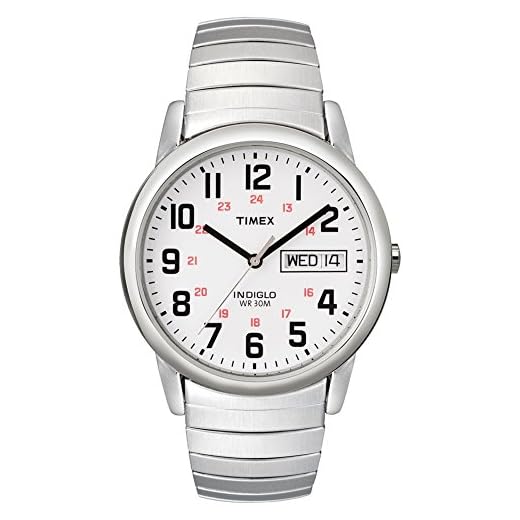

Setting Hour and Minute Hands
After extracting the crown, rotate it clockwise or counterclockwise to position the hour and minute hands to your desired reading. Ensure you pay close attention to A.M. and P.M. indicators, especially if your model includes a 24-hour format.
Finalizing Adjustments
Once the hands display the correct time, push the crown back into its original position. This action will restart the movement. If applicable, check any aligned digital screens by pressing the appropriate buttons to verify synchronization.
- If your timepiece features a calendar function, ensure the date is adjusted accordingly.
- For models with multiple time zones, consult your manual for specific settings relevant to those features.
Identify the Model of Your Timex Timepiece
Locate the model number on the back of your timekeeper. It is often engraved, starting with letters followed by numbers, which distinguishes variations. This information allows you to find the correct manual or specific instructions pertinent to your device.
Check the Packaging or Paperwork
If available, refer to the original packaging or documents. These typically include details about the specific model along with instructions tailored to it. A model name or number can often be printed prominently within the paperwork.
Utilize Online Resources
Visit the official Timex website or reputable retail platforms. Enter your timepiece’s model number or browse categories to match and verify features. Online forums can also be helpful for community insights about your specific model.
Locate the time setting mechanism
Find the crown, typically positioned on the side of the case. It might be a pull-out type or a push-button. In some models, the crown rotates to adjust the settings.
If your timepiece has additional features like a chronograph, identify secondary buttons that may be used in conjunction with the crown. Familiarize yourself with these controls; understanding their functions can facilitate the adjustment process.
Inspect the user manual for specific details related to your model, as variations exist. Some versions may require engaging the crown to a particular position, often the second click, to access the adjustment settings.
Make sure the watch is set to a stable surface or held securely to prevent accidental changes while adjusting the mechanisms.
Knowing the exact configuration of the time-setting parts is key for precise adjustments, ensuring accuracy and optimal performance. Troubleshooting any functional issues may also require this knowledge.
Adjust the Hour and Minute Hands
Gently pull the crown outwards until you hear a click. This action typically places the mechanism into the time-setting mode. Rotate the crown to move the hands; turning it clockwise will advance the hour and minute indicators forward.
Setting the Hour
When the hour hand reaches the desired position, take note of the corresponding minute reading. For precision, ensure the hour hand is placed correctly, accounting for AM or PM if your model has this feature. If you are unsure, rotate until you see the minute hand moving to align adequately with the current hour.
Setting the Minute
Continue rotating the crown until the minute hand indicates the correct time. Take care, as the minute hand moves quicker than the hour hand. If it surpasses the desired minute, simply rotate back to adjust accurately.
Once both hands point to the correct time, push the crown back into its original position. You should hear a click, confirming the mechanism is properly reset and the changes are saved.
Set the AM/PM Indicator Correctly
To ensure accurate representation of hours, adjust the AM/PM indicator appropriately. Generally, this feature is linked to the hour hand setting mechanism. Follow these detailed steps for correct adjustment:
Steps to Adjust AM/PM Indicator
1. Pull out the crown to the second position. In this position, you can rotate the hour hand without affecting the minute hand.
2. Rotate the hour hand past the 12 position until the indicator changes from AM to PM or vice versa. The indicator usually has a small window or marker that displays either “AM” or “PM.” This step is crucial for ensuring proper identification of morning and evening hours.
3. Push the crown back to its original position once the hour hand is set correctly. Verify display accuracy by observing the AM/PM marker as it should align with the current hour.
Common Modern Models and AM/PM Adjustment Features
| Model | AM/PM Adjustment Method |
|---|---|
| Weekender | Adjust via crown; AM/PM indicator linked to hour hand. |
| Expedition | Same mechanism; rotate hour hand past 12 to toggle. |
| Ironman | Digital display; AM/PM indicator updated automatically with hour setting. |
Following these steps will ensure the AM/PM feature is set accurately, providing precise reading of hours throughout your daily activities.
Synchronize the Date and Other Functions
To align the date correctly, pull out the crown to the first position. Rotate the crown clockwise or counterclockwise until the desired date appears. Ensure that the date changes appropriately at midnight; avoid adjusting between 9 PM and 3 AM to prevent damage to internal mechanisms.
If your model includes additional features such as a stopwatch or alarm, access these functions via specific buttons usually located on the side. Press the appropriate button to activate the feature, and follow the prompts on the dial, often indicated by minute markers or icons, for adjustments.
For models with a backlight, test this feature after setting the date and other functions to confirm it operates effectively. Generally, a dedicated button will illuminate the face of your device for visibility in low-light conditions.
Regularly check that all features function seamlessly. If discrepancies arise, consult the instruction manual tailored to your specific model for troubleshooting tips and maintenance guidelines.
Test the Timekeeping Accuracy
Begin testing precision by comparing your piece to a reliable reference, such as an atomic clock or a smartphone synchronized with an internet time server. Record the difference in seconds over a 24-hour period.
If the discrepancy exceeds the manufacturer’s specifications–often within a range of ±15 seconds per month for mechanical types or even tighter for quartz models–calibrate your device as needed. For quartz mechanisms, battery performance can affect accuracy; replace the battery if it shows signs of weakness.
Monitor the performance consistently over several days to confirm stability. If accuracy issues persist, professional servicing may be required to address mechanical or electronic faults that could interfere with regular functioning.
FAQ:
How do I change the time on my Timex watch?
Changing the time on a Timex watch typically involves a few straightforward steps. First, locate the crown, which is usually found on the side of the watch. Pull the crown out to the second position—this may take a gentle tug. Once the crown is pulled out, you can turn it to adjust the time. Rotate it in either direction until the correct time is displayed. After setting the time, push the crown back in to its original position to ensure the watch resumes normal function. Some Timex models may have slightly different mechanisms, so it’s a good idea to consult the user manual specific to your model for any nuances.
What should I do if my Timex watch is not keeping accurate time after adjusting it?
If your Timex watch is not keeping accurate time after you’ve set it, there are a couple of things to check. First, ensure that the crown is fully pushed back in; if it’s partially out, it can affect the watch’s timekeeping. If the crown is secure and the watch still loses time, consider that the battery might be low, especially for quartz models. Replace the battery and see if that resolves the issue. If your watch is mechanical, it may require winding. If problems persist, or if you suspect a fault in the mechanism, it could be best to take your watch to a professional for a thorough check-up and potentially a repair.