Ethan Cole

Begin with a clean canvas. Choose a digital illustration tool that you are comfortable with, such as Adobe Illustrator or Procreate. Set up your workspace with a suitable resolution to ensure clarity in your final image.
Focus on the shape of the casing first. Typically, opt for a circular or rectangular form, depending on the style you aim to achieve. Use vector shapes to define the outline, ensuring smooth curves or precise angles as required.
Next, map out the display area. Consider incorporating elements like hour markers and the overall layout of the interface. Keep the design minimalistic for a sleek appearance, or add complexity with additional functionality icons.
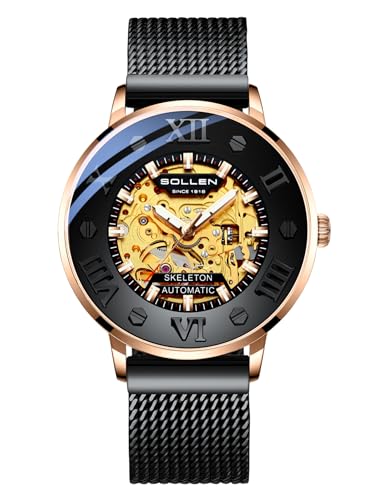
Incorporate details like buttons or a crown on the side. Pay attention to proportions, ensuring these features are both functional and aesthetically pleasing. Determine whether you want a sophisticated metallic finish or a matte look, and choose colors accordingly.


For the band, select a style–whether it’s leather, silicone, or metal links. Sketch how it attaches to the case, ensuring a seamless transition. Colors and textures here can significantly influence the overall vibe of your illustration.
Once your base elements are in place, move on to shading and lighting. Add depth by considering a light source, using gradients or shadows to enhance the three-dimensional feel. This will bring your creation to life and make it visually engaging.
Creating a Timepiece Illustration
Select a rectangular or rounded rectangle shape for the case. Adjust proportions to create the desired aesthetics.
Utilize a grid layout or guidelines for precision in placement. This aids in structuring the display area effectively.
For the screen area, draw an inner rectangle inside the case. This will serve as the main display for time and additional features.
Incorporate elements such as:
- Hours and minutes indicators, represented by digital numerals.
- A separator for the seconds with a smaller numeral or a blinking dot.
- Additional icons for functions like alarm or timer settings.
Choose colors that contrast well against the background to ensure clarity. Dark cases often pair well with light text.
Introduce texture or shadows to the case by illustrating slight gradation, which adds depth to the design.
Include buttons on the side of the case, represented as small circles or rectangles, giving them a functional appearance.
Once the primary elements are established, focus on details: fine lines, highlights, and subtle gradients. These elements enhance realism.
Review the design ensuring that proportions and alignment are consistent. Adjust any areas that seem uneven or out of place.
Finally, consider adding personalized features or branding, allowing for uniqueness in your design.
Selecting the Right Software for Digital Art
For creating intricate timepieces on screen, Adobe Illustrator is highly recommended due to its vector capabilities, allowing for clean lines and scalability without loss of quality. The Pen Tool in Illustrator is invaluable for precision in shapes and details.
If preference leans towards raster graphics, Adobe Photoshop offers extensive tools for painting and texturing. The Brush Tool can be customized for various effects, essential for achieving realistic surfaces and shadows.
Procreate is an outstanding option for tablets, combining user-friendly features and a powerful brush engine. Its intuitive interface facilitates quick sketching and iteration, making it suitable for brainstorming concepts.
CorelDRAW provides an alternative vector graphics solution, especially beneficial for typography and layout design. The extensive font library aids in typographic elements, enhancing the overall aesthetic.
Experimenting with Krita offers a free yet robust platform designed for illustrations and animations. Its open-source nature provides flexibility to explore innovative techniques without financial commitment.
For beginners, Canva allows for straightforward design processes, focusing on layout and composition rather than complex tools. This simplicity can help develop fundamental skills before transitioning to more advanced software.
Each of these applications has unique strengths tailored to different styles and workflows, so testing several options will reveal the best fit for personal artistic preferences and project requirements.
Understanding Basic Shapes and Proportions of a Timepiece
Begin by visualizing the core elements. The primary shape is typically circular, forming the face. Utilize a compass or circle tool to ensure precision. Secondary shapes like rectangles and squares are essential for the buttons or display section.
Establish the proportions by segmenting the main circle. Divide it into quarters and consider positioning numbers or indicators at consistent intervals for readability and aesthetic balance. This will also aid in aligning the additional features like the straps.
For the strap, observe a narrower rectangle shape extending from the circle. Maintain uniform width but allow for slight variations at the attachment points for a more organic feel. Consider also a slight curvature to mimic the natural contour of the wrist.
For depth perception, use shading techniques around the edges of the face to convey dimension. Create a sense of layering by implying that the screen sits slightly recessed within the outer casing.
Keep in mind the overall harmony: shapes should complement each other, ensuring the timepiece appears cohesive. This will guide you towards a polished final product that feels both balanced and functional.
Creating the Watch Face: Designing Digits and Graphics
Focus on establishing a clear visual hierarchy when crafting the display. Use large, legible numerals for hours and minutes, contrasting sharply with the background for optimal readability.
Choosing Fonts and Colors
Select fonts that echo the style of the timepiece. Sans-serif fonts impart a modern feel, while serif options convey a classic touch. Stick to a maximum of two fonts to avoid visual clutter. For color choices, utilize a palette that complements the overall aesthetic; for instance, silver or black numerals on a light background enhance visibility.
Incorporating Graphics
When adding decorative elements, keep them minimalistic. Use simple icons for features like alarms or battery indicators. Ensure that these graphics are intuitive to interpret at a glance. Consider using outlines or shadow effects to create depth without overwhelming the primary focus of the time indicators.
| Element | Recommendation | Example |
|---|---|---|
| Font | Readable, sans-serif or serif | Arial, Times New Roman |
| Color Palette | High contrast for visibility | White background, black text |
| Graphics | Simple, intuitive icons | Clocks, battery symbols |
| Layout | Balanced, central focus | Time in the center, icons below |
Final touches may include textures or gradients to add interest without detracting from the function. Preview your design on various device sizes to ensure consistency across formats. Fine-tune each element to achieve a sleek, cohesive appearance that effectively communicates the time at a glance.
Adding Details: Buttons, Straps, and Other Features
Incorporate buttons by carefully placing them along the side of the timepiece. Use varying shapes, such as circles or rectangles, to create a distinctive look. Accentuate depth by adding subtle shadows beneath the buttons for a three-dimensional effect.
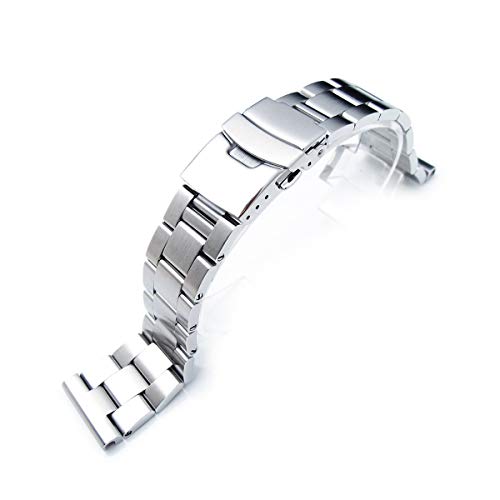
For the strap, consider different textures and materials. Create a leather strap by utilizing curved lines to depict stitching, or represent a metal band by employing straight, parallel lines interspersed with smaller sections to emulate links. Remember to adjust the width to enhance the sense of realism.
Include features like a backlight indicator or a charging port. Depict these elements with small icons or symbols near the watch face to suggest their functionality. Carefully vector these icons in size and position, ensuring they harmonize with the overall design.
Utilize gradients to add depth to the straps and case. A slight gradient from dark to light in the strap can suggest curvature and flexibility, while the case can benefit from a reflective gradient to simulate metallic surfaces.
Lastly, consider decorative elements such as patterns or logos for a personalized touch. Experiment with scale and placement to avoid overwhelming other features. A refined logo can serve as the final detail that balances the entire composition.
Applying Color and Textures to Enhance Realism
Utilize gradients effectively to mimic light reflection on surfaces. For a metallic finish, consider linear gradients that transition from a bright to a darker shade to simulate reflections. A soft radial gradient can work well for more polished areas, enhancing the watch’s three-dimensional appearance.
Textures for Realism
Incorporate textures to evoke material authenticity. For example, a brushed metal texture can be applied to the bezel for a realistic touch. Use small patterns to simulate leather or fabric on straps, ensuring they align with the overall design. Adjust opacity levels to integrate textures seamlessly without overwhelming the primary elements.
Color Harmony
Select a cohesive color palette that resonates with the intended style. Complementary colors can generate balance, while contrasting shades highlight key aspects. Utilize tools to sample colors from existing objects for a unified look. Always consider the lighting conditions in your composition and adjust colors accordingly for better depth and realism.
Exporting and Sharing Your Digital Timepiece Artwork
Save your creation in high resolution to maintain clarity when sharing. Use formats like PNG or TIFF for images requiring transparency, or JPEG for standard sharing.
During export, adjust the settings for quality and size. Higher DPI (dots per inch) is recommended for prints, while lower DPI suffices for online use. Ensure the dimensions fit within common social media platforms to avoid cropping.
Consider the following methods to share your masterpiece:
- Social Media: Platforms like Instagram, Twitter, and Facebook are ideal for showcasing your work. Use relevant hashtags to increase visibility.
- Online Portfolios: Create a dedicated website or use platforms such as Behance or Dribbble to present your artwork professionally.
- Print on Demand: Utilize services that allow you to print your designs on various products, such as t-shirts and posters, expanding your reach.
- Collaboration: Partner with other artists or brands to share your designs, benefiting from their audience and creating joint promotions.
Incorporate proper credit wherever needed, especially in collaborative efforts. This not only showcases professionalism but also builds a positive reputation within the artistic community.
Utilize artist communities for feedback and support. Platforms like DeviantArt or Reddit can provide constructive criticism and connect you with like-minded individuals passionate about design.
FAQ:
What materials do I need to draw a digital wrist watch?
To draw a digital wrist watch, you will need basic drawing materials such as paper, pencils (preferably a range from HB to 6B for shading), an eraser for corrections, and fine-tip pens or markers for outlining. If you’re working digitally, a tablet and drawing software like Adobe Illustrator or Procreate would be useful. You might also want to use references of existing digital watches to guide your design and details.
Can I use any software to create a digital wrist watch design, or are there specific programs recommended?
While you can use various software programs to create your design, some popular choices include Adobe Illustrator for vector graphics, which is great for precision, and Procreate for more freeform drawing. SketchUp can be helpful for 3D presentations. If you’re looking for free options, Inkscape is a solid vector graphics tool, and GIMP can be used for raster art. Each software has its strengths, so it’s best to choose based on your familiarity and what features you need.
What are the key elements to include in a digital wrist watch drawing?
When drawing a digital wrist watch, focus on several key elements: the watch face, which typically includes digital numbers for time display; buttons on the side for functionality; the watch strap, which can vary in design and material; and any additional features such as a heart rate monitor or Bluetooth connectivity indicators. The style and layout can differ widely, so consider the aesthetic you want, whether it’s sleek and modern or more rugged and sporty.
Is there a specific process I should follow to ensure my drawing of a digital wrist watch looks realistic?
To achieve a realistic drawing, follow these steps: First, sketch the basic shape of the watch using light pencil strokes to get proportions right. Next, add details such as the screen, buttons, and strap. Pay attention to light and shadow; this will add depth to your drawing. Shading techniques can help make the watch appear three-dimensional. Finally, outline your drawing with a fine pen and erase the pencil marks. If you’re working digitally, utilize layers to separate elements for more precise editing.