Ethan Cole

Your first step involves assembling the right components; seek out a microcontroller like an Arduino Nano or ESP32 to serve as the core. These units are compact yet powerful, capable of driving various displays and handling input with ease. Ensure you have a compatible LCD or OLED screen, which will serve to showcase the time and other functionalities you wish to implement.
Next, gather essential peripherals. A battery module or rechargeable lithium-ion battery will provide power for your creation, alongside resistors, capacitors, and a breadboard that will facilitate testing your circuit connections. Don’t forget to include buttons if you plan to offer user interaction for setting the time or toggling through features.
Once you have your materials, sketch out a schematic for your circuit. This blueprint will guide your assembly process and clarify how each component connects to the microcontroller. Take your time to ensure that every element is accounted for and correctly wired to prevent any short circuits or malfunctions.


With your circuit in place, program the firmware. Utilize software such as the Arduino IDE to write a straightforward code that defines how your microcontroller will operate the display and handle any inputs. Begin with basic functionalities like timekeeping, then incrementally add features such as alarms or ambient light detection.
As you iterate and test your setup, adjustments will likely be necessary. Patience plays a crucial role in fine-tuning your device, ensuring that it operates to your satisfaction. Finally, once fully operational, consider enclosing your creation in a stylish case. This will not only protect it but also enhance its visual appeal.
Selecting the Right Components for Your Timepiece
Opt for a reliable microcontroller, such as the ATmega328 or ESP8266, to serve as the brain of your device. These chips offer ample processing power and compatibility with various sensors and modules.
Display Options
Choose a display that suits your design aesthetics. OLED displays provide sharp contrast and low power consumption, while LCD displays are cost-effective and widely available. Ensure the chosen screen can connect with your microcontroller.
Power Supply
Select a battery type that balances longevity and size. Lithium-ion batteries are popular for their high energy density. Incorporate a charging circuit if you intend to recharge the power source. Consider adding a voltage regulator to maintain consistent output to the components.
Don’t overlook the importance of a real-time clock (RTC) module, which ensures accurate timekeeping when the main processor is powered down. The DS3231 module is highly regarded for its precision and low power usage.
Gather other components like resistors, capacitors, and breadboard for prototyping. These essential parts will support your circuit during testing and adjustments. Make certain all elements are compatible and meet your design specifications to create a functional and visually appealing gadget.
Understanding and Programming the Microcontroller
Select the right microcontroller based on your project’s requirements. Popular options include the Arduino Nano, ATmega328P, or ESP8266. Consider I/O pins, memory, and power consumption when making your choice.
Basic Setup
Begin by connecting the microcontroller to your computer using a USB cable. Install the relevant software, such as the Arduino IDE, to write and upload the code. Ensure that the correct board and port are selected.
Programming Fundamentals
Use C or C++ for programming. Start with basic functions like setup() and loop(). The setup() function initializes settings, while loop() runs continuously. For timekeeping, libraries such as Time or RTClib can simplify working with time data and keeping accurate track.
To display time, configure the pins connected to an LCD or OLED screen. Use commands to set up the display and update it with time data. Debug using the serial monitor to check values being read from the time library.
Explore implementing buttons for setting time. Use pull-up resistors to ensure stability in signals when buttons are pressed.
For power management, consider sleep modes on the microcontroller to prolong battery life. A brief code snippet may involve setting the microcontroller to enter a low-power state and waking it up via an interrupt from a button press.
Test individual components and their connections. Ensure that the microcontroller properly communicates with the display and inputs before combining functionalities.
As development progresses, refine the code by optimizing algorithms and reducing complexity. Refactoring the code improves readability and efficiency, making future adjustments easier.
Designing the Face Layout and Features
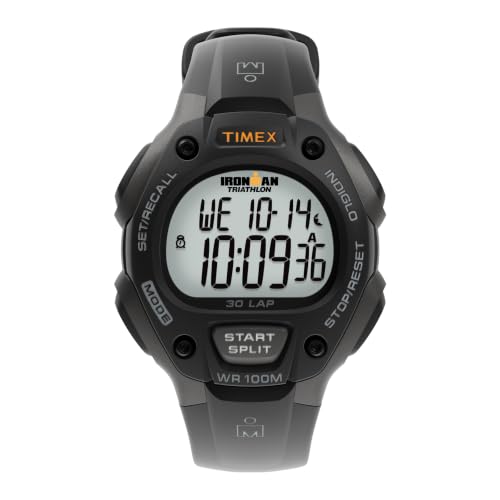
Focus on simplicity and clarity when arranging the display elements. Incorporate an easy-to-read font style with ample size for quick glance visibility. Ensure the time indicators, such as hours and minutes, are prominently placed, utilizing contrasting colors to enhance legibility.
Feature Set Prioritization
Select features based on user needs. Consider incorporating the following:
- Time display (12/24 hour format)
- Alarm functionality
- Chronometer feature
- Date display
- Battery level indicator
Position the most frequently accessed features in a way that aligns with natural viewing angles. This can improve user experience significantly.
Enhancing Usability
Utilize icons for various functions to reduce text clutter. Integrate tactile feedback through buttons or gestures to confirm user interactions visually. Ensure that transitions between different modes, such as switching from time to alarm, are smooth and intuitive.
Lastly, consider mood lighting or adaptive brightness options to enhance usability in varying light conditions. A well-thought-out layout and feature design can significantly impact the overall experience of the device.
Assembling the Circuit and Attaching Components
Begin by connecting the microcontroller to the breadboard. Ensure the power pins of the microcontroller align with the power rails on the breadboard for stable voltage supply. Place the resistors, capacitors, and any other components according to the schematic designed previously.
Wiring Connections
Utilize jumper wires to establish connections between the microcontroller and components like displays or buttons. Pay attention to the polarity of components, such as LEDs, ensuring correct orientation to prevent damage. Use a multimeter to verify connections when in doubt.
Testing the Circuit
Before final assembly, power on the circuit and perform a functionality test. Verify that the display lights up, inputs respond correctly, and the microcontroller processes signals as intended. Troubleshoot any issues that arise, by checking connections and component placements as needed.
| Component | Function |
|---|---|
| Microcontroller | Processes signals and executes programmed functions |
| Display Module | Shows time, date, and additional features |
| Resistors | Limit current to protect components |
| Buttons | Allow user input for settings |
| Battery | Powers the entire circuit |
Once all components are verified, proceed to secure them. Consider using soldering techniques for permanent connections or connectors for easy disassembly. Ensure sufficient space for the circuit in the casing to avoid short circuits and damage during usage.
Enclosing the Device in a Custom Case
Select a material that complements the aesthetic and functionality. Options include plastic, metal, or even wood. Consider the weight and durability based on your requirements. For a lightweight solution, use acrylic sheets, while aluminum offers robustness.
Measuring and Cutting
Accurately measure the dimensions of the components including the microcontroller and display module. Transfer these measurements to your chosen material. Use a precision cutting tool to achieve clean edges, ensuring that all elements fit snugly within the enclosure.
Creating Access Points
Design openings for buttons, charging ports, and display visibility. If you utilize a touchscreen, ensure the front surface is clear of obstructions. For buttons, cut small holes aligned with the switch positions to allow unhindered access.
After cutting, smooth all edges with sandpaper or a file to eliminate sharp surfaces. This enhances comfort when wearing and provides a finished appearance. Consider painting or coating the case for additional aesthetics and protection from wear.
For assembly, utilize screws or adhesive for a secure fit. Ensure all components are firmly placed to prevent movement during use. If possible, incorporate a removable back panel for easy access to the internal parts, facilitating maintenance and battery replacement.
Incorporating these elements results in a robust and visually appealing enclosure that enhances both the functionality and style of your creation.
Testing and Troubleshooting Your Wearable Device
Begin with a visual inspection. Ensure all components are securely attached and there are no visible signs of damage. Look for misplaced or loose connections that could affect performance.
Power Verification
Check the battery output with a multimeter. Ensure it provides adequate voltage. Replace the battery if the voltage is below the required level for your circuit.
Functionality Tests
- Run a basic functionality test: verify the display activates and shows the correct time.
- Test buttons and any sensors. Use a simple code to check if inputs respond as expected.
- Perform the calibration for sensors if applicable. Ensure they report accurate readings.
Debugging Code
Upload diagnostic sketches to your microcontroller to check for errors in your program. Serial prints will help identify where issues occur. Pay attention to logical errors and ensure the code flow aligns with expected outcomes.
Compiling Information
- Document anomalies including unexpected behavior or display issues.
- Take notes on any recurring problems to address them systematically.
Common Issues and Solutions
- No Display: Check connections and power supply. Test the display separately if possible.
- Incorrect Time: Ensure you initialize the time correctly in the code and check for battery life.
- Unresponsive Buttons: Inspect button connections and verify that the code handles input accurately.
Regular testing and quick troubleshooting will enhance reliability and performance of your wearable gadget, ensuring functionality matches your design goals.