
 Ethan Cole
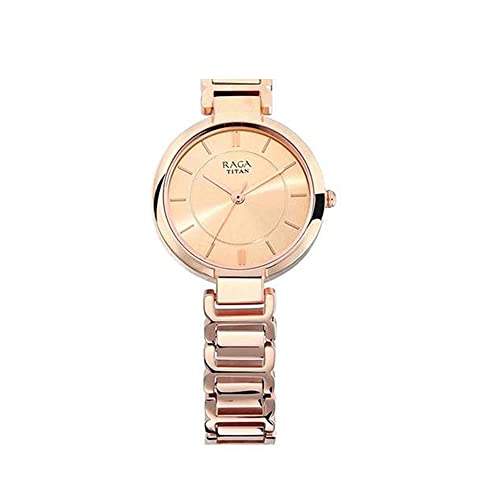
First, locate the crown on the right side of your timepiece. Gently pull the crown away from the case until you feel it click. This action typically shifts to the time adjustment mode.
Next, rotate the crown in either direction to adjust the hour and minute hands to your desired position. Ensure that the hour hand aligns appropriately with AM or PM indications if your model has them.
After precise adjustments, push the crown back into the normal position to initiate regular operation. Ensure that the hands are moving correctly by observing the second hand’s movement. Your timepiece is now accurately displaying the current time.


Adjusting the Hour on a Titan Timepiece
Begin by locating the crown on the side of your accessory. Gently pull the crown out to the first position to access the date setting feature.
Once in this mode, turn the crown clockwise or counterclockwise to modify the date as needed. Ensure that the date adjustment occurs before 12 PM or 12 AM to avoid potential complications with the calendar mechanism.
To proceed with altering the hour, pull the crown out to the second position. This action will allow you to manipulate the hour hand directly. Rotate the crown in the desired direction until the desired hour appears.
Be cautious with the AM/PM distinction; referencing a reliable source can help prevent misalignment. Once the adjustments are complete, gently push the crown back to its original position to secure the changes.
Routine checks once in a while ensure your timepiece remains accurate and functional. This care will prolong the life of your accessory and maintain its precision.
Understanding the Types of Titan Watches
The collection includes several categories with distinct features. Analog models are traditional with classic dial displays, catering to those who appreciate timeless elegance. Quartz variants offer precision and low maintenance, ideal for everyday wear.
For enthusiasts, automatic options provide intricate mechanics and craftsmanship, appealing to collectors. Smart styles combine advanced technology with fashion, allowing users to track fitness and receive notifications. Diving selections are robust, designed for underwater activities, ensuring durability and water resistance.
For formal occasions, dress models offer sleek designs that complement business attire. Casual timepieces prioritize comfort and style for everyday use. Limited editions create exclusivity, attracting connoisseurs seeking unique pieces.
Each category serves different needs and preferences, enabling consumers to choose a perfect match for their lifestyle.
Locating the Crown and Adjusting Position
Identify the crown, typically located on the right side of the case. It may either be a screw-down crown or a push-pull variant. Pull gently to reach the first or second position, depending on your model.
Understanding Crown Positions
The crown usually has three positions:
| Position | Function |
|---|---|
| Position 1 | Wind the mechanism |
| Position 2 | Adjust the date |
| Position 3 | Adjust the hour and minute hands |
Adjusting Clock Hands
For models that allow hand adjustment, pull the crown to position three. Rotate clockwise or counterclockwise until the desired hour and minute are displayed. Push the crown back to its original position to secure the settings.
Adjusting the Hands on Analog Titan Timepieces
To accurately indicate hours and minutes, pull the crown outwards to the second position. This will allow you to manipulate the minute hand directly.
Rotate the crown clockwise or counterclockwise until the minute hand points to the desired position. Align this hand with the hour hand to ensure synchronization.
Once the minute hand is set, push the crown back to its original position to start the movement. This action will secure the hands in place and resume the normal function of the mechanism.
For models featuring a date function, ensure the date display is accurately adjusted by setting it to the appropriate day as needed. Always avoid adjusting the date while the clock is between 8 PM and 4 AM to prevent damage to the internal mechanism.
Periodically check the accuracy of the timepiece and make adjustments as needed. Regular maintenance will ensure longevity and precision in operations.
Configuring the Time on Digital Titan Watches
Press and hold the “Mode” button until the display flashes. Use the “Adjust” button to navigate between the settings for hour, minute, and seconds.
Adjusting the Hour and Minute
Once in the hour setting, press the “Adjust” button to increment the hour. After reaching the correct hour, press “Mode” again to switch to minutes. Use the same method to fine-tune the minute display.
Finalizing Settings
After confirming the minutes, press the “Mode” button again to exit the configuration mode. The display will revert to the normal timekeeping mode, showing the updated information.
Synchronizing with Time Zones
To accurately align your device with various regions, follow these steps:
Identifying Your Reference Zone
Determine your current location’s standard offset from Coordinated Universal Time (UTC). For example, UTC+0 for London, UTC-5 for New York, or UTC+5:30 for India.
Adjusting the Display
- For analog models, pull the crown to the second position to modify time indicators.
- For digital models, locate the settings menu, usually accessible via a dedicated button.
Shifting to the Desired Offset
Rotate the crown or use navigation buttons to reach the appropriate hour setting based on your locale.
Confirming the Adjustment
- Recheck against a reliable source to ensure accuracy.
- After adjustment, verify the date and any additional features like alarms or timers if needed.
Regular updates to your device will ensure it reflects local changes, especially during daylight saving transitions or regional changes in timekeeping practices.
Troubleshooting Common Time Setting Issues
If adjustments are not registering on your timepiece, ensure the crown is fully engaged. Sometimes, it may not be in the correct position, impeding the setting mechanism.
Another issue could arise if the mechanism is stuck. Gently pull out the crown to its second position and turn it carefully. This action can help unjam any internal components.
Battery Concerns
If the device is digital, check the battery status. A low battery may cause malfunctioning features. Consider replacing the battery if you notice any delay in response during adjustments.
Incorrect Model Handling
Make sure you are following the correct procedure specific to your model. Reference the user manual, as variations exist across different designs and functions. Utilizing incorrect methods can lead to confusion and frustration.
Lastly, if nothing works, consult a professional or authorized service center. They possess the expertise to address complex issues that may not be easily solved at home.
FAQ:
How do I set the time on my Titan wristwatch?
To set the time on your Titan wristwatch, first locate the crown, typically found on the right side of the watch. Gently pull the crown out to the first or second click, depending on your model. Turn the crown to adjust the hour and minute hands to the desired time. Once set, push the crown back in to the original position to secure the settings. Make sure to check that AM or PM settings are correct if your watch features a 12-hour format.
What should I do if my Titan watch doesn’t have a crown?
If your Titan wristwatch does not have a traditional crown, it might utilize a different mechanism for time setting, such as buttons on the side. Check the user manual for specific instructions related to your model. Generally, you will press and hold a button to access time-setting mode, and then use nearby buttons to adjust the time. If you don’t have the manual, you might find resources online or contact customer service for assistance.
Can I change the time on my Titan watch if it’s digital?
Yes, if your Titan watch is digital, adjusting the time is quite straightforward. Press the ‘Mode’ or ‘Set’ button until the time display begins to blink. Use the ‘Hour’ and ‘Minute’ buttons to make your adjustments. After you’ve set the correct time, press the ‘Mode’ or ‘Set’ button again to confirm and exit the setting mode. It’s advisable to refer to your watch’s manual for specific button functions, as they can vary among different models.
Are there any tools needed to set the time on a Titan watch?
In most cases, you won’t need any special tools to set the time on your Titan wristwatch. Simply use your fingers to operate the crown or buttons. However, if your watch has a very small crown or stubborn buttons, a tool like a rubber grip might be helpful to gain better traction. It’s always a good idea to handle the watch with care to avoid any potential damage while adjusting the settings.
What should I do if I set the time incorrectly on my Titan watch?
If you realize you’ve set the time incorrectly on your Titan watch, simply repeat the time-setting process. Pull out the crown (or use the appropriate buttons for digital models) and adjust the time to the correct settings. Make sure to push the crown back in or exit the setting mode to avoid any further adjustments. If you find that the time frequently resets or changes unpredictably, consider having the watch checked by a professional to ensure it’s functioning properly.


