
 Ethan Cole
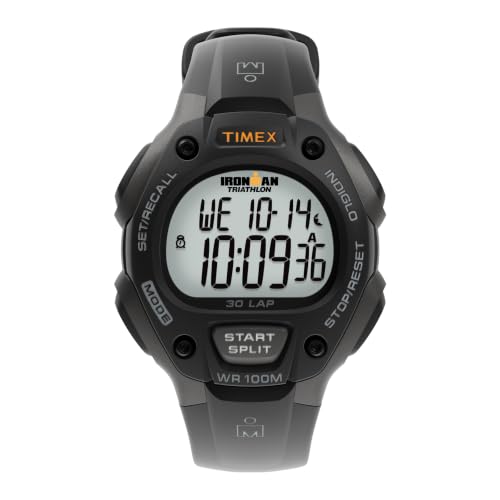
Access the main menu by pressing the designated button on your timepiece. This action will typically bring up various settings, including time adjustments, stopwatch features, and alerts. Navigate through the options using the control buttons until you find the reminder settings.
Once you reach the alert configuration, select the option to create a new notification. Enter the desired time using the hour and minute buttons. Many models will allow you to set the reminder for a specific date as well. After specifying the details, confirm the selection to activate your alert.
Customize additional features such as the sound or vibration pattern for the notification if your time display supports it. Ensure that your device is not in silent mode, as this may prevent the alert from being heard. Test the reminder function after setting it to ensure proper operation before relying on it for important timings.


Finally, save your configurations and exit the menu. The timepiece will typically display a message indicating that the alert has been successfully set. If needed, refer to the user manual for troubleshooting tips or further instructions specific to your model.
Instructions for Activating Reminder on a Timepiece
Begin by locating the buttons on the side of your timepiece. Most models feature a dedicated button for accessing the reminder function, often labeled with an “AL” or similar abbreviation.
Press this button once to enter the reminders menu. Use the navigation buttons to scroll through the options available. You will typically see choices for programming, reviewing, or turning off reminders.
Programming the Reminder
Once in the programming mode, you will see the default time displayed. Adjust the hour by pressing the corresponding button until the desired hour appears. Confirm the hour setting by pressing the same button or a confirmation button.
Next, adjust the minutes using the designated button. Similar to the hour, press until the correct minute shows up, then confirm your selection. Look for an indicator that displays the current setting has been saved.
Activating the Reminder Notification
After programming, confirm that the reminder function is active. This is usually indicated by a small icon on the screen. If necessary, toggle the switch to activate it. You may also be prompted to choose a tone or vibration setting for the reminder notification.
Exit the menu by pressing the designated exit button. Verify that your settings are correct by checking the screen for the reminder indicator. If adjustments are needed, repeat the steps outlined above.
Understanding Your Digital Wrist Watch Features
Familiarize yourself with the buttons on your timepiece. Most models feature a combination of buttons for various functions, including time setting, stopwatch functionality, and configuration options. Identify symbol labels corresponding to each function for easier navigation.
Interpret the display settings effectively. Many models allow toggling between different time formats, such as 12-hour and 24-hour displays. Adjust this according to your preference for clarity.
Explore the timer capabilities. Aside from alerts, many timepieces include countdown timers. This feature can serve diverse purposes, from workout intervals to meal preparation. Familiarize yourself with how to access and utilize this option in your device.
Examine any additional utility features. Look for other functionalities like a calendar, backlight, or even smartwatch connectivity options. These may enhance your experience by providing instant access to essential information.
Review the user manual provided with your timepiece. This document is typically detailed and will explain all available functionalities and how to maximize them for your needs. Consult it to clarify any uncertainties.
Regularly update the device firmware, if applicable. Some advanced models offer periodic updates to enhance performance and functionality. Keep an eye on the manufacturer’s website for any available updates.
Take note of battery life. Be aware of how often you need to replace or recharge the battery for uninterrupted usage. Regularly monitoring this will help prevent unexpected downtime during critical times.
Finding the Alarm Function on Your Watch
Locate the mode button, typically positioned on the side. Press it multiple times until you see a display change, indicating access to various functions.
Look for an icon resembling a clock or bell. This visual cue usually signifies the notification feature. If there are multiple icons, consult the user manual for specifics corresponding to your model.
If an illuminated screen is available, observe any touchscreen options that allow you to toggle between functions. Swiping may reveal a direct link to notification settings.
Sometimes manufacturers integrate settings for numerous notifications into a singular menu. Explore the settings menu, and consider pressing both the ‘mode’ and ‘select’ buttons simultaneously to delve deeper into the configuration options.
Check for any user-friendly guides or QR codes on the packaging; these resources often lead to useful tutorials or help videos applicable to your specific timepiece.
Familiarize yourself with navigating the interface, as using a combination of buttons may be necessary. Persistence in exploring different avenues within the device can lead to successful engagement with the notification feature.
Setting the Alarm Time Correctly
Begin by identifying the correct mode on your timepiece, as it may vary among different models. Most devices will display the current time prominently; use the mode button to navigate until you reach the programming sequence for the notification function.
Next, utilize the hour and minute buttons to adjust the time accurately. For some models, pressing the hour or minute selector will toggle between increments. Confirm the changes by checking for a confirmation symbol or listening for a sound indicating successful programming.
Pay attention to AM and PM settings, if applicable. Ensure the time reflects the appropriate part of the day. In many models, switching between AM and PM can be achieved by pressing a designated button; keep an eye out for an indicator on the screen.
Once the desired time is set, finalize the process. This usually involves pressing the mode button again or a dedicated confirmation key. Some models may require a long press to ensure the changes are saved. Verify that the notification icon is visible on the display, indicating the function is active.
Testing is recommended. After programming, allow some time to pass and ensure that the reminder activates as intended. Adjust if necessary by repeating the previous steps. Familiarize yourself with the user guide for additional features or variations specific to your timepiece model.
Adjusting Alarm Volume and Sound Options
Locate the volume or sound settings on your timepiece, usually found in the main menu or settings options. Turn the volume up or down using the designated buttons, ensuring the notification is adequately audible for your needs.
For devices offering various sound profiles, you may choose from pre-set tones or upload custom sounds, if supported. Access the sound library through the settings menu and listen to the available options before making a selection.
If your model features vibration, adjust its intensity alongside the audio settings for a balanced alert system. Some advanced models allow you to synchronize sound and vibration for a multi-sensory reminder.
Always test the volume and sound settings after making adjustments. A short check ensures that the notifications will be effective at the intended time, preventing potential oversights. If necessary, read the user manual for specific instructions tailored to your particular device’s capabilities.
Activating and Deactivating the Alarm
To activate the notification feature, press and hold the designated button until you see the indicator light up on the display. Make sure you hear a confirmation sound or see a visual cue indicating that the feature is now active.
Steps to Activate
- Locate the button assigned for activating settings.
- Press and hold until the screen indicates activation.
- Adjust any necessary parameters, such as time or frequency.
- Confirm the setup by releasing the button, ensuring you see the visual confirmation.
Deactivation Process
To turn off the notification feature, follow these simple steps:
- Press and hold the same button you used for activation.
- Watch for the indicator to turn off; this may take a moment.
- Ensure that the confirmation sound or visual cue signals deactivation.
Regularly check to ensure that the feature is functioning correctly, especially if you rely on it for important reminders or alerts. Some models may require you to navigate through menus to manage this feature, so consult your device’s manual if the above steps do not align with your specific model.
Troubleshooting Common Alarm Issues
Check if the device is in silent mode. Toggle the sound settings to ensure notifications are enabled. If the time isn’t displayed correctly, adjust the time settings; an incorrect time can prevent alerts from triggering.
Inspect the battery. Low power can lead to malfunctioning features. Replace the battery if necessary. If the programmed time doesn’t activate, verify whether the correct time format (AM/PM) is selected.
If multiple alerts are set, one might interfere with another. Temporarily deactivate all alerts to determine if any single setting is causing the issue.
Review the user manual for potential manufacturer-specific troubleshooting steps. If issues persist, performing a factory reset might resolve chronic problems but be aware that this may erase saved settings.
If the device offers firmware updates, consider downloading the latest version. Updates often address bugs that can impact alert functionalities.
| Issue | Potential Solution |
|---|---|
| Silent Mode | Toggle sound settings |
| Incorrect Time | Adjust time settings |
| Low Battery | Replace battery |
| Conflicting Alerts | Deactivate all alerts |
| Chronic Problems | Perform factory reset |
| Software Bugs | Update firmware |



