Ethan Cole

These compact devices utilize an advanced combination of accelerometers and algorithms to monitor your movements accurately. By sensing the acceleration of the body at various angles, they can determine different activities, estimating the number of steps taken throughout the day.
Movement data is collected continuously, and sophisticated algorithms process this information to distinguish between walking, running, and periods of rest. This allows the device to provide users with actionable insights into their daily physical activity.

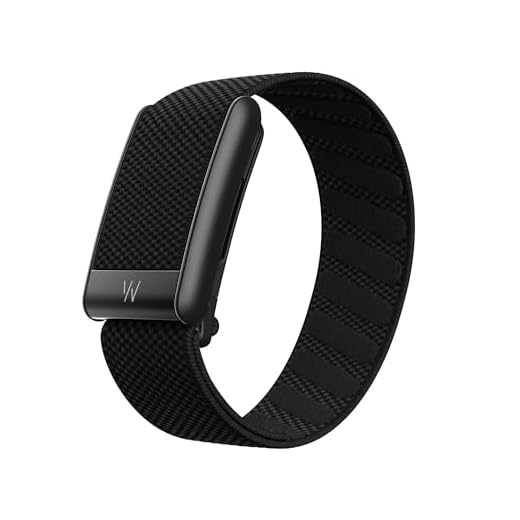
For optimal performance, ensure the tracker is fitted correctly on your arm, as its position affects the accuracy of the readings. Regular calibration and syncing with a smartphone application can further enhance its functionality, providing a comprehensive overview of your fitness routines.
Understanding the Sensors Used in Fitness Trackers
Accelerometers and gyroscopes serve as the core sensors in fitness devices, detecting physical movement and orientation. These components work cohesively to capture data regarding steps and activity levels accurately.
Accelerometers
Accelerometers measure linear acceleration along multiple axes. Generally set in three dimensions (X, Y, Z), they track movement in a specified direction. Some key features include:
- Detects motion related to walking, running, and other physical activities.
- Capable of differentiating between various types of movement (e.g., stationary vs. active).
- Calibrated to minimize false readings, providing enhanced data accuracy.
Gyroscopes
Gyroscopes augment the information gathered by accelerometers by measuring angular velocity, thus giving insights into the orientation. Their contributions are significant due to:
- Improving precision in recognizing specific physical activities.
- Allowing for adjustments in step counts based on hand movements, such as swinging while walking.
- Enhancing the ability to track dynamic activities, including cycling and aerobics.
When integrated, these sensors can provide a holistic understanding of a user’s physical activity levels, helping to create a more personalized tracking experience. Enhanced algorithms further utilize this data, producing metrics that inform users about their fitness goals and progress.
Accurate Step Measurement Techniques
To achieve precise tracking of movement, many devices utilize built-in accelerometers. These sensors detect changes in motion by measuring acceleration along multiple axes. The data gathered allows for the calculation of step frequency and duration, contributing to an accurate step count.
Data Filtering Algorithms
Implementing advanced filtering algorithms is critical. These algorithms analyze sensor data to distinguish between walking and other activities, such as running or sitting. By identifying movement patterns, they significantly reduce errors in step counting, ensuring that only relevant motion contributes to the total.
Calibration for Personalization
Customizing settings based on individual stride length enhances accuracy. Users can input their stride measurements to allow the device to convert step counts into distance more effectively. Regular calibration, especially after significant lifestyle changes or adjustments in footwear, is recommended to maintain precision in tracking.
Incorporating these features makes modern tracking devices reliable companions for monitoring physical activity accurately. Regular updates to the algorithms further ensure that the technology adapts to various walking styles and conditions, enhancing the user experience.
Battery Life and Power Management in Step Trackers
Optimizing battery life is paramount for these devices, with many achieving operational longevity from energy-efficient components. Users can expect a typical lifespan of 6 months to 2 years, depending on usage and battery type. For instance, a CR2032 coin cell battery is commonly used, known for its reliability and accessibility.
Power-Saving Features
Modern models integrate several power management features to prolong energy use. Automatic sleep mode engages when the tracker is stationary for extended periods, significantly conserving energy. Additionally, customizable display settings allow users to adjust brightness and screen timeout duration, further enhancing battery efficiency.
Charging Solutions
Some advanced iterations employ rechargeable batteries with USB charging capabilities. This convenience eliminates the need for battery replacements and promotes environmental sustainability. Users should adhere to manufacturer guidelines regarding charging frequency to maximize the lifespan of rechargeable batteries.
Maintenance Tips
Regular software updates can also contribute to enhanced energy management as manufacturers continuously refine algorithms for improved performance. Periodic recalibration may be necessary to ensure accurate readings and optimize battery consumption. Overall, mindful use and regular maintenance will ensure that these fitness trackers remain functional for extended periods.
Synchronizing Data with Mobile Applications
Employ Bluetooth technology to establish real-time connections between the tracking device and mobile platforms. This facilitates seamless data transfer, enabling instant updates on physical activity metrics.
Users should check for compatibility with popular applications such as Apple Health or Google Fit. Many devices support syncing with these platforms, allowing for centralized data management and analysis.
Regularly update the companion app to ensure all features function optimally. App developers often release patches that enhance synchronization processes and improve user experience.
Utilize cloud storage solutions offered by some manufacturers, allowing data to be accessed across multiple devices. This feature enables users to retain historic activity logs and trends over time.
Setting specific synchronization intervals can optimize battery usage. Consider configuring the device to sync data every few hours rather than in real-time to extend operational longevity.
For troubleshooting connection issues, reset the Bluetooth settings on the mobile device and the tracking unit. A fresh connection often resolves intermittent data transfer problems.
| App | Features | Compatibility |
|---|---|---|
| Apple Health | Activity tracking, Health monitoring | iOS devices |
| Google Fit | Activity insights, Goal setting | Android devices |
| Fitbit App | Comprehensive metrics, Social sharing | iOS, Android |
| Samsung Health | Wellness programs, Community engagement | Samsung devices, Android |
Analyzing Additional Features of Modern Wrist Devices Tracking Activity
Address specific functionalities like heart rate monitoring, sleep tracking, and GPS navigation. These features extend the utility beyond basic motion detection, providing users with comprehensive health insights.
Heart Rate Monitoring
Opt for devices equipped with optical sensors that offer continuous heart rate tracking. This data is invaluable for assessing cardiovascular health during physical activities. Users are encouraged to leverage this feature for tailored workout intensities.
Sleep Tracking
Many modern models include sleep analysis capabilities. This function generally monitors movement patterns to determine sleep quality and duration. Users should prioritize comprehensive reports to make informed lifestyle adjustments for improved rest.
GPS functionalities allow for accurate tracking of distance during outdoor activities, essential for runners and cyclists. Ensure the device can sync with global positioning satellites to maintain precision and avoid errors commonly associated with step-count metrics alone.
Another beneficial feature is the integration with third-party applications and platforms, permitting more extensive data analysis. Users can connect their devices to fitness apps for additional performance metrics, nutritional tracking, and shared community challenges.
These advanced features enhance daily activity monitoring, making modern tracking devices versatile tools for anyone serious about fitness and wellness management.
Troubleshooting common issues with device functionality
If step counts appear inaccurate, first ensure that the device is securely fastened to the wrist. A loose fit may lead to erratic readings. Additionally, recalibrating the settings or updating the firmware might enhance accuracy.
If battery life seems reduced, check for excessive brightness settings or background features running continuously. Lower screen brightness and disable unused functionalities to extend battery longevity.
Data synchronization issues with mobile applications can often stem from Bluetooth connectivity. Ensure that both the device and smartphone are within close proximity and that Bluetooth is enabled on both devices. Restarting both may resolve connection problems.
Inconsistent performance may occur after a software update. If the device exhibits unexpected behavior, performing a factory reset can help restore normal operations. Be sure to back up any important data first.
For devices that seem unresponsive, a simple reboot can often restore functionality. If the issue persists, charging the device fully may revive it if the battery was inadvertently drained.
Finally, familiarize yourself with the user manual for troubleshooting specific error codes or indicators, as manufacturers often include comprehensive guidance for resolving common problems.